

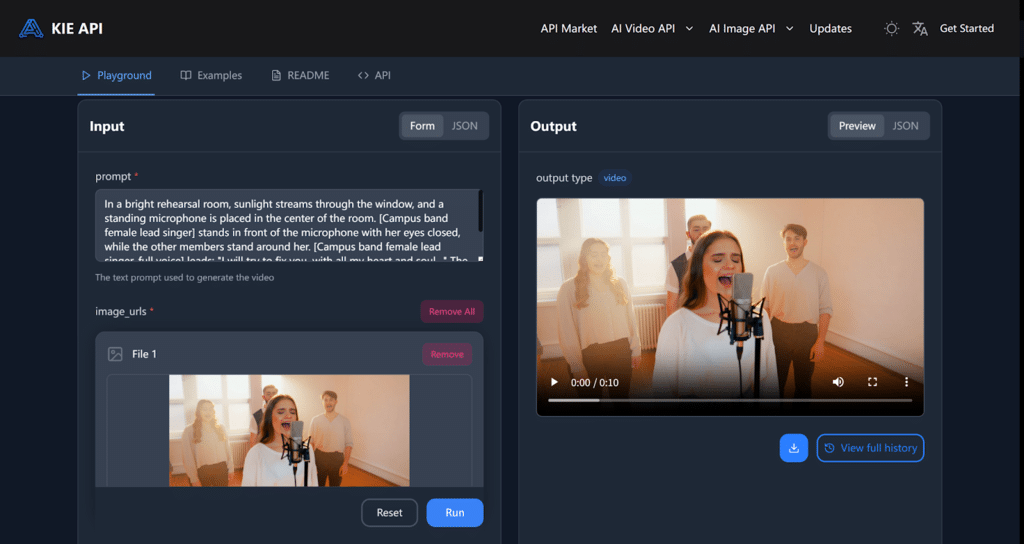
Creating compelling video content has become an essential part of modern communication for businesses and creators alike.Kling 2.6 API makes this process effortless by offering seamless integration of synchronized visuals, voiceovers, and sound effects. With Kling 2.6 API, you can easily generate high-quality videos from text or images, saving time and reducing the complexity of traditional video production.
Whether you’re transforming text or images into dynamic videos, Kling 2.6 API automates the process, offering a seamless way to produce professional content without the need for extensive editing. In this guide, we’ll walk you through integrating Kling 2.6 API on Kie.ai for a faster and more efficient video creation experience.
Explore the Features of Kling 2.6 API
Synchronized Audio and Visuals for Seamless Creation
One of the most powerful features of Kling 2.6 API is its ability to generate synchronized visuals, voiceovers, and sound effects in a single process. Unlike traditional video creation, where audio and visual elements must be manually edited and aligned, Kling 2.6 API automates this process, making it easier to create immersive and professional content quickly. Whether you’re using text or images, the system automatically generates both the video and the corresponding audio, eliminating the need for separate editing.
Full Control Over Audio Elements
With Kling 2.6 API, creators have complete control over every audio aspect. You can describe who speaks, what they say, and even adjust the emotion conveyed in the speech. Additionally, the API allows you to generate and fine-tune sound effects and ambient
sounds, giving you full flexibility to adjust the pacing, rhythm, and overall atmosphere of the video. This level of control ensures that the audio perfectly matches your creative vision.
Effortless Video Creation with Text or Images
Creating a video with Kling 2.6 API is simple and intuitive. Just input your desired text or upload images, and the system automatically generates the video with synchronized audio and visuals. There’s no need for complicated editing or manual adjustments—Kling 2.6 API handles all the details, allowing creators to focus on their message without getting bogged down by technical tasks.
High-Quality, Layered Audio for Realistic Soundscapes
The audio quality generated by Kling 2.6 API is clear, rich, and realistic. It supports various sound types, including voice narration, environmental sounds, and special effects, all layered together to create a truly immersive audio-visual experience. The API closely mimics real mixing effects, ensuring that the audio complements the visuals perfectly, whether it’s the voiceover or subtle background noises.
Why Choose Kling 2.6 Video API by Kie.ai
Affordable Pricing for High-Quality Video Creation
Kie.ai’s Kling 2.6 API offers competitive pricing, making it accessible for both small businesses and large enterprises. Whether you’re generating a 5-second video with or without audio, the rates are highly budget-friendly. The pricing structure for Kling 2.6 API is as follows: 5 seconds without audio at $0.28, 10 seconds without audio at $0.55, 5 seconds with audio at $0.55, and 10 seconds with audio at $1.10. This makes Kling 2.6 API one of the most cost-effective solutions for businesses and creators looking to generate high-quality video content with seamless audio integration.
Comprehensive Kling 2.6 API Documentation and Support
Kie.ai provides detailed Kling 2.6 API documentation, ensuring that developers and content creators can easily integrate it into their projects. The clear and comprehensive guides make it simple to get started and implement the API into your video production workflow. Additionally, Kie.ai offers robust technical support to help resolve any issues quickly, ensuring a smooth and hassle-free experience.
Free Trial for New Users
For those new to Kling 2.6 API, Kie.ai offers a free trial. This allows users to test out the full functionality of the API before committing to a paid plan. The trial period gives you the chance to explore the features of Kling 2.6 API, from text-to-video generation to image-to-video transformation, without any upfront costs. It’s a risk-free way to experience the power of Kling 2.6 API for your content creation needs.
Stay Updated with API Changes
Kie.ai ensures that users are always informed about the latest updates to Kling 2.6 API. The platform provides an API updates log, so you can easily track new features, improvements, and bug fixes. This ensures that you are always using the most up-to-date version of Kling 2.6 API, with the latest advancements in video and audio generation technology.
How to Integrate Kie.ai’s Kling AI 2.6 API
Step 1: Obtain Your Kling 2.6 API Key
To get started with the Kling 2.6 API, the first step is to sign up for an account on Kie.ai. Once registered, you will be provided with a unique Kling 2.6 API key. This key is essential for authenticating your requests and ensuring secure communication between your application and the Kling 2.6 API.
Step 2: Create a Task for Video Generation
After obtaining your Kling 2.6 API key, the next step is to create a new task for video generation. To do this, you’ll need to make a POST request to the Kling 2.6 API with the appropriate API and input parameters, such as a text prompt or image URL. Additionally, you can specify the video duration and decide whether to include sound. Optionally, you can also provide a callback URL for notifications when the task is completed.
Step 3: Monitor Task Status
Once the video generation task has been created, you can track its progress by sending a GET request to check the task status. The response will tell you whether the task is still in progress, queued, or has been completed successfully. If the task encounters an issue, the response will include error details to help you troubleshoot.
Step 4: Retrieve the Generated Video
Once your task is successfully completed, you can retrieve the generated video by accessing the result URLs provided in the response. These URLs link directly to the video content, which you can then download or integrate into your application as needed. If the task fails, the response will contain the necessary error details to help you address the issue.
Important Considerations When Integrating Kling 2.6 API
Kling 2.6 API Key Management
Ensure that your Kling 2.6 API key is kept secure. Avoid sharing it publicly, as it is required for authenticating your requests. If you suspect that your API key has been compromised, regenerate it immediately through your Kie.ai account dashboard.
Proper Input Data Formatting
When submitting data to the Kling 2.6 API, make sure the input parameters, such as text prompts and image URLs, are correctly formatted. For example, ensure that the image URLs are valid and accessible, and the text prompts do not exceed the 1000-character limit. This will prevent errors during task creation and ensure optimal video generation.
Kling 2.6 API Rate Limits and Quotas
Be aware of any rate limits or quotas that may apply to your Kling 2.6 API usage. Depending on your account type, there may be restrictions on the number of requests you can make in a given time period. Make sure to check the Kie.ai documentation for any rate limits and manage your usage accordingly to avoid disruptions.
Error Handling
If the task fails, the response will contain an error code and message. Be prepared to handle different types of errors, such as invalid input parameters, network issues, or internal server errors. Efficient error handling will help you quickly identify and resolve any issues in your video generation process.
File Size Limitations
If you’re uploading images for video generation, keep in mind that there is a file size limit of 10MB per image, and only certain formats (JPEG, PNG, WebP) are accepted. Ensure that your images meet these requirements to avoid upload errors.
Effortless Video Creation with Kling 2.6 API by Kie.ai
Kling 2.6 API provides a seamless and efficient way for creators and businesses to generate high-quality videos. By integrating synchronized audio and visuals with ease, it simplifies the video creation process—whether you’re turning text into dynamic videos or generating immersive content from images. With flexible features, clear Kling 2.6 API documentation, and competitive pricing, it’s a great choice for anyone looking to enhance their video production without the hassle of traditional editing.