


Many SaaS products feel powerful yet hard to grasp. Buyers see dashboards, integrations, and technical language, but struggle to understand how the product changes their daily work or business outcomes.
Visual storytelling bridges that gap by turning complexity into something people can follow quickly and remember later.
As products grow more advanced, explanations often become harder to follow. Decision-makers skim between meetings. They scan instead of reading.
Long documents and feature lists rarely hold attention long enough to build clarity or confidence. The result is familiar: strong products that fail to communicate their real value.
Visual storytelling offers a structured way to present complex ideas through narrative and design so buyers understand both how a product works and why it matters.
This guide shows how to use visual storytelling in a practical way.
What Visual Storytelling For SaaS Actually Means
When I talk about visual storytelling for SaaS, I am not talking about a pretty UI tour or a logo animation. I mean a deliberate mix of visuals, story structure, and user insight that shows how your product changes work for real people.
Instead of listing features, a strong story follows a character with a problem, the friction they feel, the moment they discover the product, and the change that follows. You can apply that pattern to:
- SaaS explainer videos
- Interactive demos and product tours
- Animated walkthroughs
- Customer story videos
Animation is especially helpful when the product is invisible: APIs, data flows, security layers, or machine‑learning models.
Simple icons, pipelines, and dashboards make those ideas graspable in seconds. Done well, the customer is the hero, the SaaS product is the guide, and both technical and business buyers see why it matters.
Why Visual Storytelling Outperforms Traditional SaaS Marketing
Most SaaS marketing falls into the feature trap. Every site talks about integrations, uptime, and security, so everything sounds the same and buyers default to price or whoever follows up most often.
Features are important, but they are also easy to copy. A clear, customer‑centered story is not.
Only a small slice of the market is actively buying at any moment. Feature‑driven pages speak almost only to that group.
Visual stories create mental bookmarks for the much larger group that is not ready yet. When their need becomes urgent, the brand with the clearest story usually wins the first meeting.
Because stories carry emotion, people repeat them. Instead of “it has a lot of integrations,” they say “it stopped our deals from slipping through the cracks.” A two‑minute explainer that shows a real workflow often does more for conversions than ten pages of technical copy.
The Psychology Behind Why Visual Stories Make Complex Products Stick
Visual stories work because they match how the brain prefers to take in information. When I present ideas both visually and verbally, the brain encodes them in two ways at once, which makes recall much easier later.
The brain also reads images far faster than text. A messy spreadsheet next to a clean automated dashboard communicates chaos versus control in a glance.
For a time‑poor VP, a good video often feels lighter than reading a long product page, even if it carries the same information.
Story structure adds another layer. Following a character through a problem and positive change puts viewers into a mental state where they drop their guard and imagine themselves inside the story.
That is why prospects who have seen a strong explainer arrive at sales calls better informed and more open.
Core Elements Of Effective Visual Storytelling For SaaS Products
Every strong story for a complex product rests on a few layers: a clear message, emotional pull, and honest understanding of how the product really works. If one is missing, the video or demo may look nice but will not move numbers.
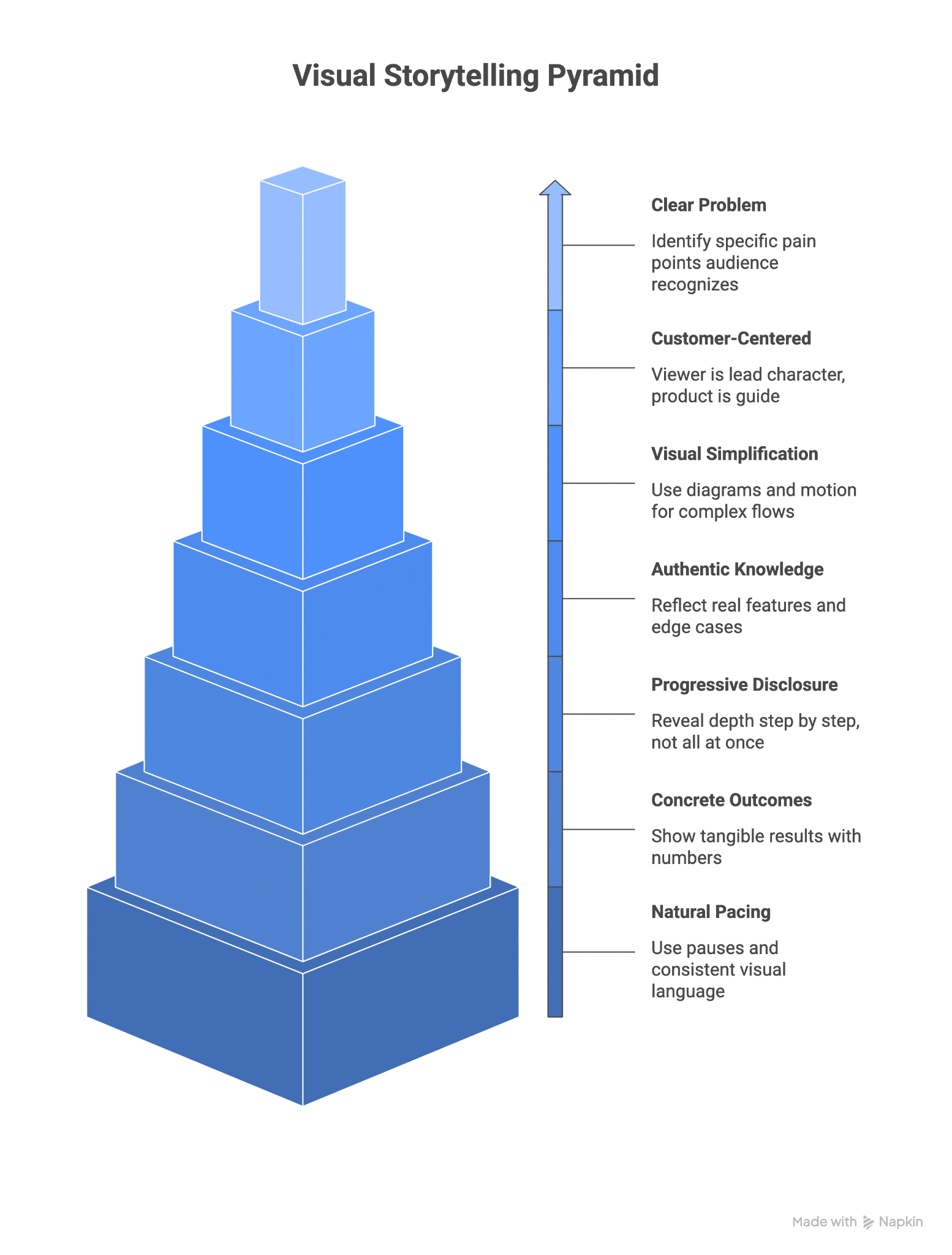
Strategic Frameworks For Structuring Your SaaS Visual Narratives
Once I know the message, I still need a structure. Story frameworks give a repeatable way to arrange scenes so they feel natural and easy to follow. For SaaS, three patterns cover most needs: a hero narrative, the Pixar formula, and a problem‑focused pattern for technical buyers.
The Hero’s Path For Product Change
The Hero’s Path works well when you want to show a full before‑and‑after change. It starts in the ordinary world where work is messy or stressful, moves to a call to act when the character discovers your product, then shows tests as they roll it out with their team. The story ends once the new way of working becomes the new normal.
In this pattern, the customer is always the hero and the SaaS product is the guide providing tools, steps, and prompts. It suits full explainer videos, homepage hero sections, and deeper customer stories.
Short pieces focus on the starting pain and final state; longer ones spend more time in the middle, showing how change happens inside the product.
The Pixar Formula For Quick Product Explanations
Pixar’s simple pattern is perfect for punchy SaaS explainer videos:
- Once upon a time – Show the customer’s normal workday.
- Every day – Highlight how that routine creates stress or waste.
- One day – They find your product.
- Because of that – Things start to improve.
- Because of that – The improvement spreads across the team.
- Until finally – Land on a clear, positive outcome.
This chain of cause and effect gives the story momentum and makes it easy to retell inside a company. Visually, give each line its own scene so the viewer has time to see each shift.
The Problem-Agitation-Answer Framework For Technical Buyers
For technical audiences, I often use a problem–agitation–answer pattern. First, spell out a clear technical problem with real logs or data, not vague claims.
Then explore what that problem means for reliability, cost, or security so the viewer feels the full weight of it. Only after that do you walk through the product and how it addresses each part of the problem.
Visuals make this pattern much stronger: charts that show error rates climbing, animated flows that reveal bottlenecks, and screen recordings that prove exactly how your product changes those flows.
Keep the tone calm and factual. The goal is to create urgency without fear, then show evidence that the product handles the hard parts buyers worry about.
Visual Storytelling Formats That Work Best For Complex SaaS Products
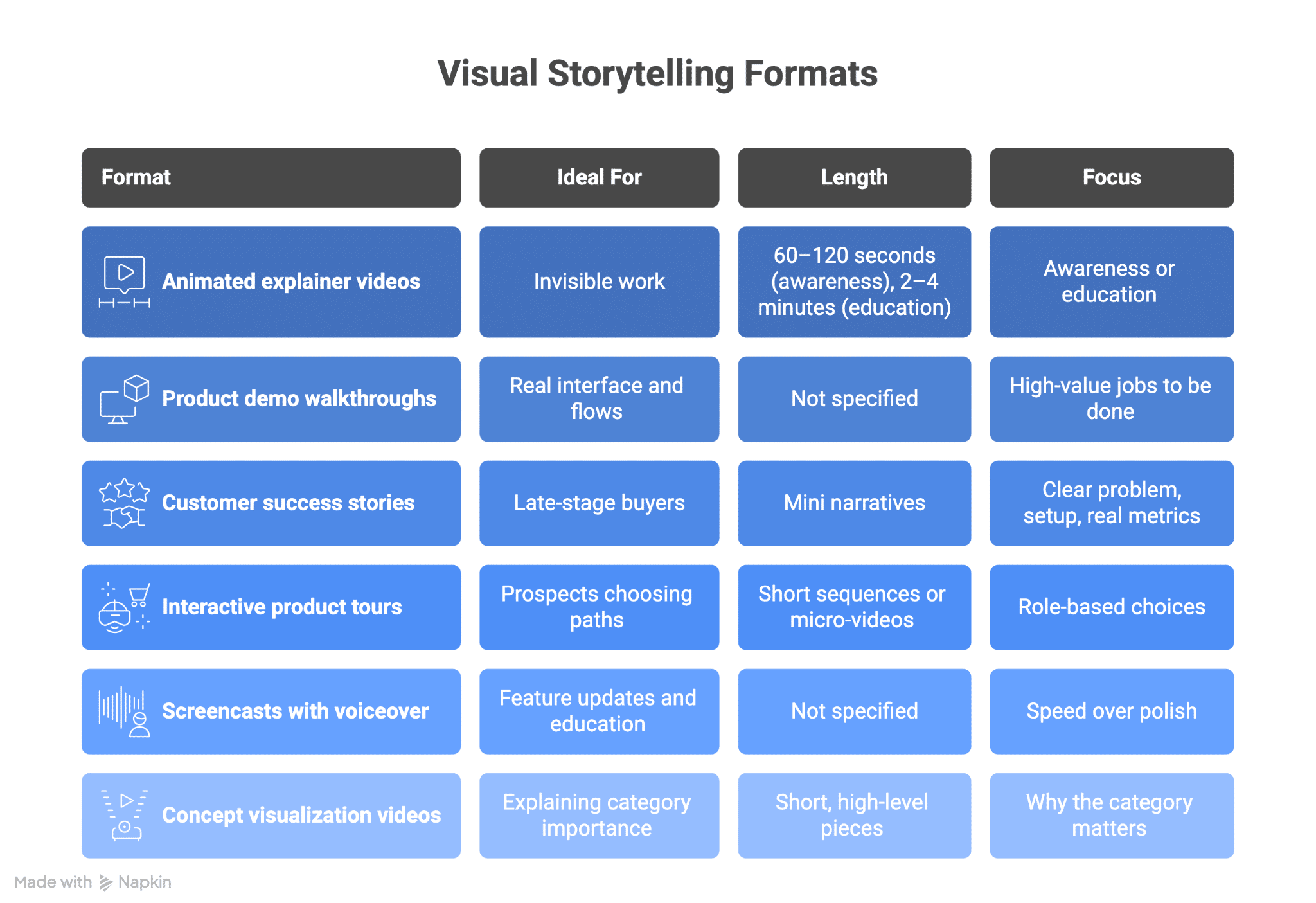
Different stories need different containers. The right format depends on how abstract the product is, where the viewer sits in the buying process, and what decision comes next.
Strong options include:
How To Translate Technical Features Into Visual Stories That Sell
Many SaaS teams have features that impress engineers but leave buyers cold. “Ten thousand requests per second” or “zero‑copy architecture” sound powerful, yet they do not answer the quiet question: how does this change my workday?
A simple process helps:
- Find the human problem behind each feature. Every capability exists because someone once felt a specific pain: a developer stuck waiting on a slow API, a finance manager reconciling clashing reports.
- Choose visual metaphors for abstract actions. Data can move as streams or packages, integrations as bridges, automation as a clean production line, security as vaults or gates.
- Show a clear before and after. Split‑screen views work well: the old manual, error‑prone way on one side, the new streamlined flow on the other.
- Layer on numbers. Short on‑screen text like “reporting time cut from 3 hours to 15 minutes” turns a story into a business case.
- Map features to real user paths. Instead of listing “role‑based access,” show an admin granting access with a couple of clicks during a team change.
When viewers see their own tasks in the story, they stop thinking “interesting tech” and start thinking “this fixes my problem.”
Adapting Your Visual Story For Different Buyer Personas And Buying Stages
A single SaaS deal can involve a founder, a VP, a security lead, finance, and the people who will use the tool every day. Each group cares about different things, so the same core story needs different angles and depths.
By stage:
- Awareness. Keep it high level and problem‑focused. Aim for 30–90 seconds that make someone think “this describes my world,” not “this is my next purchase.” These live on social feeds, ads, and homepage hero sections.
- Consideration. Bring in real screens and concrete claims. Show how the product handles a few key jobs better than the old way. Two to four minutes is common for product pages and nurture emails.
- Decision. Go deeper on workflows, scale, and risk. Four to eight minutes can work if every second earns its place. Sales teams use these in live calls and as follow‑ups.
By persona:
- Technical users need accuracy: real UI, real logs, and honest flows.
- Business leaders want outcomes: revenue, cost, and speed.
- End users care about friction: how many steps and clicks disappear.
Across all of this, keep one shared story spine so buyers hear a consistent message from first ad to final demo.
Best Practices For Maintaining Authenticity While Simplifying Complexity
Reducing complexity does not mean dumbing a product down; it means stripping away noise while keeping what matters. If you cut too much, you lose trust with technical buyers. If you keep everything, you lose everyone else.
The only way to balance this is with real product knowledge. When I work with SaaS teams I study the architecture, sit in on demos, and listen to customer calls. That lets me decide which details must stay on screen and which can move into follow‑up assets or documentation.
Language matters just as much. Real customers rarely say “we struggle with fragmented data silos.” They say “I copy numbers between tools and I do not trust any of them.”
Scripts built from real phrases sound natural instead of like a buzzword bingo card. Before final delivery, I test content with technical and non‑technical people close to the buyer group and adjust based on their reactions.
Common Visual Storytelling Mistakes That Make SaaS Products Seem More Confusing
Plenty of SaaS videos and demos make products look harder than they are. The problem is rarely the product itself; it is the story choices.
Common mistakes include:
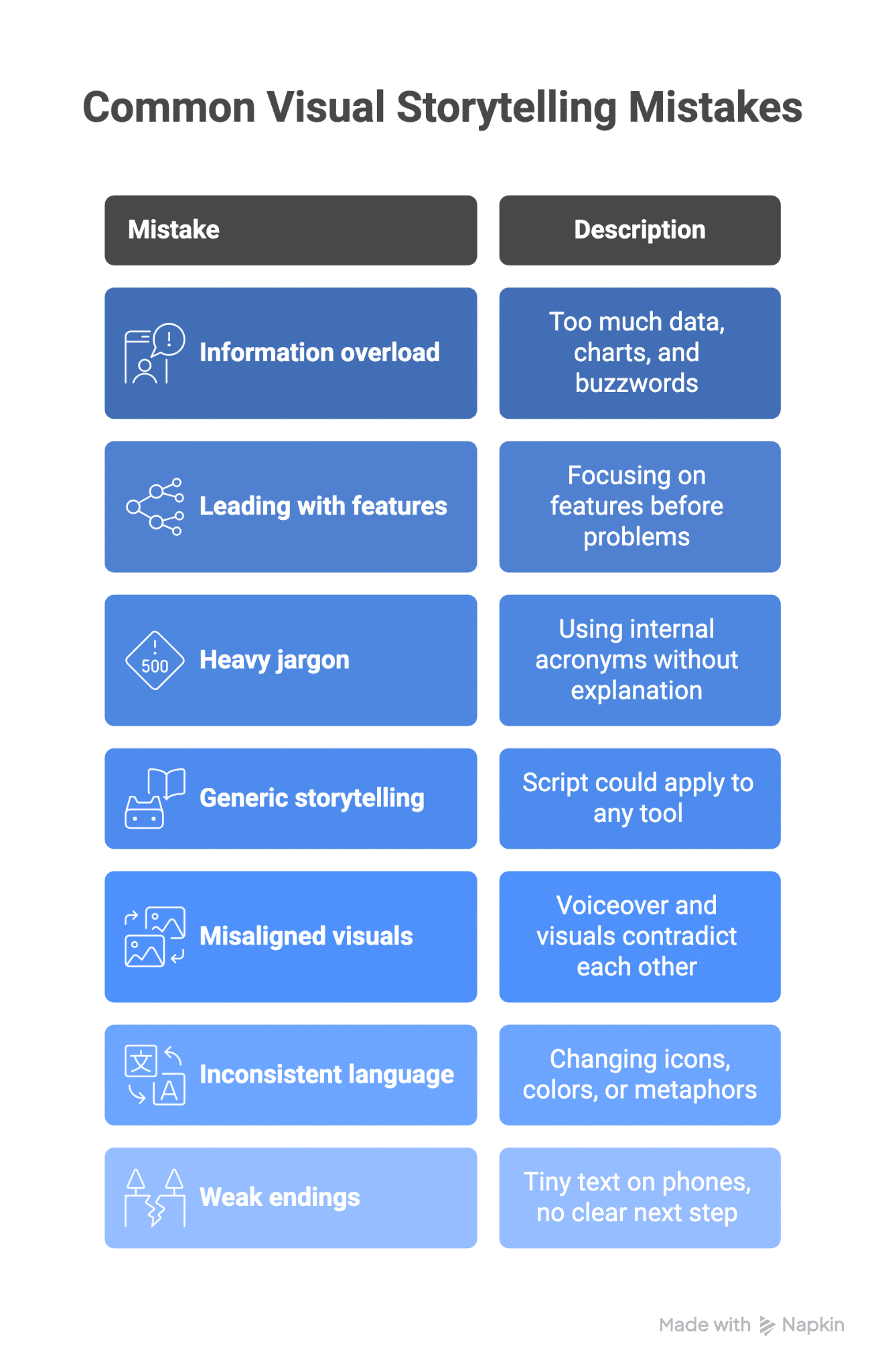
Fixing even one of these issues can make a complex product feel much simpler and safer to adopt.
Measuring The Impact Of Visual Storytelling On Product Understanding And Conversions
Storytelling is not soft work when it is measured well. I always connect visual content to numbers that matter so teams can keep improving.
Practical ways to measure impact:
- Engagement. Track view completion rate, average watch time, and repeat views to see whether people stay with the story or drop off early.
- Signals of understanding. After launch, ask sales whether prospect questions change. Fewer “what do you do” questions and more “how would this fit our stack” questions show progress.
- Conversion lift. Compare signup, demo request, or “book a call” rates between visitors who watched a video and those who did not, and before versus after adding a visual story to a page.
- Sales‑cycle impact. Look at time from first touch to close, or how many opportunities stall in the middle. Strong stories often mean fewer calls and faster decisions.
- Customer feedback. Ask new customers which assets helped them “get it” and watch review sites or communities for mentions of specific videos.
I recommend tracking a simple time‑to‑comprehension metric: the time between first touch and the moment a prospect can clearly explain your product back. Good visual stories keep that number low.
Conclusion
Feature lists alone rarely win SaaS markets. Competitors can copy a dashboard or API faster than ever, but they cannot copy the story buyers carry in their heads about what your product does for them. That is why clear visual storytelling for SaaS is no longer a nice extra; it is a core part of serious growth.
Visual stories turn complex products into simple, human narratives that people remember long after they close the tab.
They match how the brain learns, speak to both logic and emotion, and give teams a fast way to see value. Built on real product knowledge and honest customer insight, they shorten sales cycles, raise conversion rates, and improve every sales conversation.
If you are working on a complex SaaS product that deserves to be understood and chosen more often, I would be glad to help turn it into a clear, compelling visual story at What a Story that drives real business results.
Author Bio: 
Vikas is the Co-founder & CEO of What a Story, helping B2B SaaS companies simplify complex ideas through clear messaging and high-impact videos. His work has been featured on TEDx, Contra, HubSpot, and more, and he focuses on helping founders clearly communicate what they do and why it matters.