

What Is a DMARC Lookup and Why It Matters
A dmarc lookup is the process of querying DNS to find and evaluate a domain’s published DMARC policy. DMARC—Domain-based Message Authentication, Reporting, and Conformance—is an email authentication standard defined in RFC 7489 that helps domain owners prevent unauthorized use of their domains in phishing and spoofing campaigns.
A proper dmarc record lookup checks whether a domain has a valid DMARC record published as a DNS TXT Record at _dmarc.yourdomain.com. This record tells receiving mail servers how to handle messages that fail authentication and alignment checks. Without a valid dmarc record, attackers can impersonate a brand more easily, damaging trust, email deliverability, and overall reputation protection.
Why DMARC Is Central to Email Authentication
DMARC builds on two foundational standards: SPF and DKIM. SPF, or Sender Policy Framework, verifies whether a sending server is listed as one of the domain’s authorized senders. DKIM, or DomainKeys Identified Mail, uses cryptographic signing to confirm that a message was not altered in transit.
A dmarc check goes further by verifying alignment between these authentication results and the visible header from the domain. This alignment requirement is what makes DMARC especially effective in the modern email ecosystem.
When You Should Run a DMARC Lookup
You should perform a dmarc lookup when launching a new domain, changing email vendors, investigating failed delivery, reviewing dmarc compliance, or moving toward stricter dmarc enforcement. Regular dmarc validation is also useful for MSP, Mid-Market, and Enterprise environments where multiple platforms send mail on behalf of one domain name.
How a DMARC Checker Tool Works
A dmarc checker automates the process of finding, parsing, and validating a domain’s DMARC configuration. Instead of manually performing a dns lookup, reading raw TXT syntax, and interpreting tags, a dmarc checker presents the results in a clear format with diagnostic checks, errors, and recommended fixes.
Tools such as MXToolbox, EasyDMARC, and other platforms listed on SourceForge, Expert Insights, or G2 Crowd often include a dmarc record checker, domain scanner, Email Health, Blacklists, and broader Diagnostics features. Some platforms may also promote recognition such as Mid-Market Leader on G2, Momentum Leader on G2, Category Leader, or Expert Insights Awards depending on their market position.
Step 1: DNS Query and TXT Record Discovery
A dmarc checker starts by querying DNS for the DMARC txt record. The expected location is:
_dmarc.example.com
If the dmarc record lookup finds no record, the domain has no published DMARC instructions. If it finds multiple records, that is a misconfiguration because a domain should publish only one valid DMARC record.
What the Tool Reads
The checker reads tags such as v=DMARC1, p=, rua=, ruf=, pct=, adkim=, aspf=, and ri=. Good tools also provide dmarc tag explanations so administrators understand what each tag controls.
Example DMARC Record
v=DMARC1; p=quarantine; rua=mailto:*dmarc*@example.com; ruf=mailto:forensics@example.com; adkim=s; aspf=s; ri=86400
This dmarc record requests quarantine for failing messages, sends an aggregate report to the Reporting URI in rua, and sends a forensic report using ruf.
Step 2: Syntax and Policy Validation
A dmarc diagnostic tool performs syntax checks to confirm that the record follows RFC 7489. This stage of dmarc validation identifies invalid tags, missing values, unsupported policy options, malformed email addresses, and incorrect separators.
A strong dmarc check also evaluates whether the selected dmarc policy supports the organization’s security goals. For example, p=none is useful for monitoring, but it does not block abuse. To reach meaningful dmarc enforcement, organizations typically progress from none to quarantine and eventually to reject.
Understanding DMARC Records, Policies, and Alignment
A dmarc record is not just a static DNS entry. It is a policy document that defines how receiving servers should treat unauthenticated mail, where they should send dmarc reports, and how strictly alignment should be evaluated.
DMARC Policy Options: None, Quarantine, and Reject
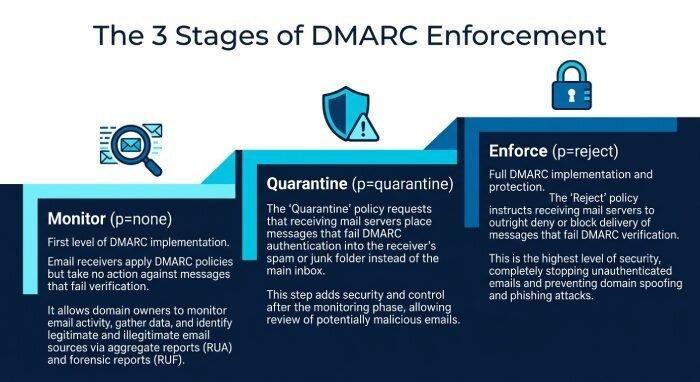
The p= tag defines the dmarc policy:
- p=none: Monitor authentication results without changing message disposition.
- p=quarantine: Send suspicious mail to spam or junk folders.
- p=reject: Block failing messages at the gateway.
Moving toward quarantine or reject is the core of dmarc enforcement. However, enforcement should happen only after a thorough dmarc record lookup, review of legitimate senders, and repeated dmarc check cycles.
Policy Distribution and Percentage Control
The pct= tag controls policy distribution by applying the policy to only a percentage of failing messages. For example, pct=25 applies the selected dmarc policy to 25% of failures. This helps teams phase in dmarc enforcement safely.
Reporting Interval
The ri= tag sets the reporting interval for aggregate feedback. A common value is 86400, meaning one daily aggregate report.
SPF and DKIM Alignment
DMARC depends on either SPF or DKIM passing in alignment with the visible sender domain. SPF authentication validates the sending IP against the published spf record, while spf alignment checks whether the SPF-authenticated domain aligns with the header domain.
DKIM works similarly. A dkim record publishes the public key in DNS, and the receiver verifies the DKIM signature. dkim signature alignment confirms that the signing domain aligns with the visible domain. Successful message validation requires at least one aligned pass: SPF or DKIM.
DMARC Reporting and Visibility
DMARC reporting is one of the protocol’s most valuable features. The rua tag enables aggregate report (rua) delivery, while ruf enables forensic report (ruf) delivery when supported by receivers.
Effective dmarc reporting shows who is sending mail for your domain, which systems pass SPF or DKIM, and which sources fail alignment. Platforms with a Delivery Center, Domain Scanner, or API Reference can help security and operations teams convert raw XML data into actionable insights.
Common DMARC Lookup Errors and How to Fix Them
A dmarc lookup can reveal small issues that have major consequences for email security and deliverability. Regular record testing helps prevent authentication failures before they affect customers, employees, and partners.
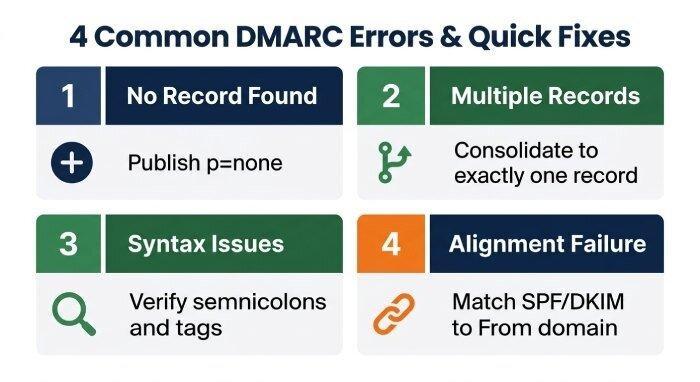
No DMARC Record Found
If a dmarc record lookup returns no record, publish one at _dmarc.yourdomain.com. Start with p=none and add a valid Reporting URI so you can begin dmarc reporting before enforcement.
Example:
v=DMARC1; p=none; rua=mailto:*dmarc*@example.com
This supports initial dmarc compliance while you identify legitimate mail streams.
Multiple DMARC Records
A domain must have only one DMARC record. Multiple TXT entries cause receivers to ignore the policy or treat it as invalid. Use a dmarc record checker or dmarc checker to detect duplicates, then consolidate all required tags into a single record.
Common Consolidation Mistake
Administrators sometimes add a new vendor’s recommended dmarc record without removing the old one. This creates a DNS conflict and breaks dmarc validation.
Invalid Syntax or Unsupported Tags
Syntax issues often include missing semicolons, invalid policy values, incorrect mailto: formatting, or unsupported tags. A dmarc check should confirm that the record begins with v=DMARC1 and contains a valid dmarc policy.
SPF or DKIM Passes but DMARC Fails
This usually indicates an alignment problem. The mail originator may pass SPF with a vendor-owned return-path domain, while the visible From address uses your brand domain. Similarly, DKIM may pass but sign with a third-party domain. Fix this by configuring custom SPF, DKIM, and sender domains with each email service provider.
Best Practices for Strengthening Domain Email Security
Strong dmarc compliance requires more than publishing a record. It requires ongoing monitoring, careful vendor management, and a phased path toward dmarc enforcement.
Start with Monitoring Before Enforcement
Begin with p=none to collect data through dmarc reporting. Review every source that appears in your reports, including marketing platforms, CRMs, help desks, billing systems, and internal mail servers. Once legitimate senders are authenticated and aligned, move gradually to quarantine, then reject.
Maintain SPF, DKIM, and DMARC Together
Keep your spf record current and avoid exceeding DNS lookup limits. Ensure every critical sender uses DKIM with a valid dkim record. Then use a recurring dmarc lookup and dmarc validation workflow to confirm the domain remains protected.
Use a Trusted DMARC Checker and Domain Scanner
A reliable dmarc checker should support dmarc record lookup, dns lookup, syntax analysis, alignment review, reporting insights, and historical monitoring. Solutions such as MXToolbox and EasyDMARC can help teams identify misconfiguration, monitor blacklist exposure, and improve overall email authentication posture.
Prepare for BIMI and Brand Trust
Once your domain reaches strong dmarc enforcement, you can consider BIMI. BIMI allows verified brand logos to appear in supported inboxes, but it typically requires a DMARC policy of quarantine or reject. Some vendors also offer Managed BIMI services to simplify logo validation and certificate management.
Build a Repeatable Compliance Process
Schedule recurring dmarc check reviews, document authorized senders, test every new platform before production use, and review dmarc reports after DNS changes. This repeatable process improves dmarc compliance, supports long-term email security, and reduces the risk of brand impersonation across the global email ecosystem.