

Why Content Creators Need AI Music Generation Tools
Content creators need AI music generators now more than ever. They produce ready-to-use BGM quickly, cutting production time for original scores. Customizable tracks also boost professionalism, align with video, podcast, and game pacing, and avoid generic sound.
The hit all-in-one AI music generator MakeBestMusic uses natural-language interaction to generate and export professional tracks quickly. It’s the secret weapon for creators to publish high-quality content steadily, and a smart assistant for beginners to start making music. This article breaks down AI Music Generation’s key features to optimize your workflow, boost overall creation efficiency, and make your work more professional and unique.
One-Click Music Generation: Key Features of MakeBestMusic
- Full natural language interaction support
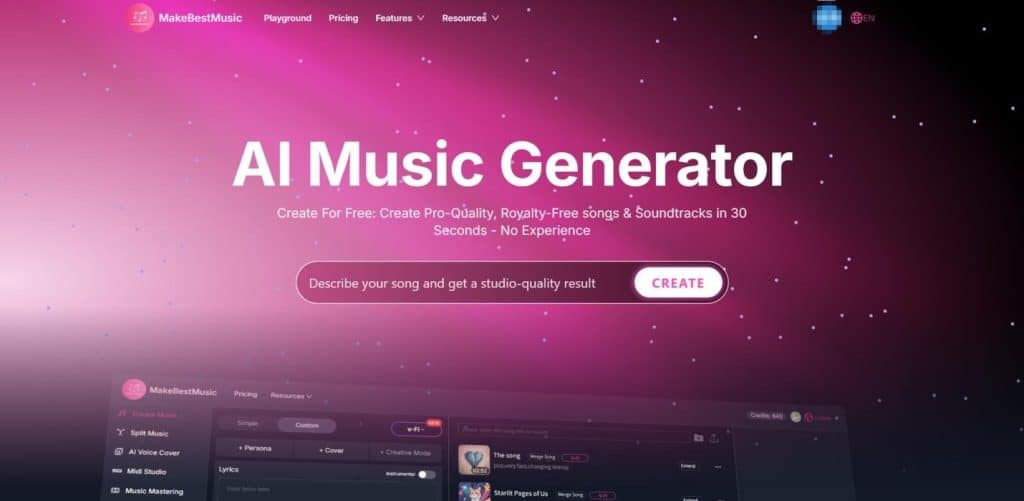
Natural language interaction is a standout feature of MakeBestMusic, lowering the barrier to AI music creation to an absolute minimum. You no longer need to master obscure technical terms like Lento, Acoustic, or Ballad. With MakeBestMusic’s text-to-song capability, the creative process feels as natural as chatting with an old friend.
- Simple Mode: Plain Text, Straight to Melody
Craft songs without worrying about technical jargon. With Simple Mode in MakeBestMusic’s Create Music, you can effortlessly express unspoken emotions, cherished memories, or fleeting insights on life. Whether describing a moving movie scene or the visual impact of an art exhibition, MakeBestMusic accurately captures the emotional tone behind your words and turns them into fully structured, richly orchestrated original songs or instrumental tracks.
For example, to create an original piece for a family reunion, simply enter: “I want songs suitable for family gatherings.”
Every regular user can turn emotions and memories directly into shareable musical works, with a drastically lowered barrier to creation. For both content creation and personal expression, you can efficiently produce unique, emotionally distinctive audio pieces.
- Lyrics Generator: Auto-generated professional-grade prompts
For every plain line you input, MakeBestMusic’s AI Lyrics Generator automatically analyzes it and creates professional prompts featuring lyric structure, emotional arc, and instrumental combinations. For example, just enter “I want songs suitable for family gatherings,” and MakeBestMusic delivers.
This means you focus on heartfelt creative inspiration, while the AI handles the technical refinement—ensuring every delicate emotion is paired with the most precise musical expression. It quickly turns scattered ideas into audition-ready music demos, letting you validate mood and style in record time and cut down on trial and error.
Even with no musical background, anyone can consistently produce high-fidelity, fully realized tracks.
- Styles Describe: Intuitive Style Customization
Even when working with real composers, customizing music requires professional terminology—but not with MakeBestMusic. To tailor your original tracks, you don’t need any technical jargon.
In the style settings, simply describe your ideal vibe—whether it’s “like a morning breeze through the woods” or “a touch of nostalgic cinematic feel”. This interactive style of understanding turns “what you imagine is what you get” into reality for everyday creators.
- Easy Customization Just for You
MakeBestMusic not only supports hassle-free inspiration capture but also offers a full suite of customization tools for creators seeking a unique sound. Whether you’re a beginner or a professional musician, you’ll find your perfect workflow here.
- Inspiration Imitation: Your Shortcut with “For You”
If you don’t have a clear idea of your ideal melody, the For You feature in Simple Mode on the Create Music page is your perfect starting point. The platform curates a preset example library with diverse genre categories, including Country, Blues, Rock, and more—each featuring 4–5 high-quality representative tracks. This helps users quickly find direction when unsure of their preferred style: listen, compare, and select the track that best matches their mood, then click Create Similar.
With one click, you’ll generate songs with a matching style and rhythm, enabling efficient bulk production of music with consistent tonality. It’s ideal for scenarios demanding tight creation and publishing schedules.
- Community Explore: Catch the Trend in “Explore”
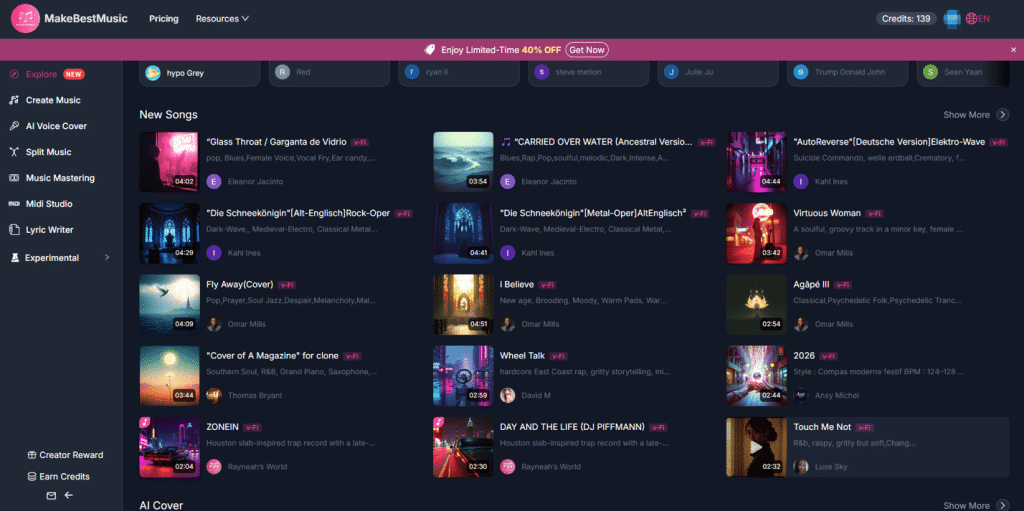
With the brand-new Explore interface, dive straight into an ocean of UGC inspiration. It gathers top creative works from users worldwide—find style tags you love, and turn others’ standout moments into fuel for your own creations. Get instant inspiration and direction from real user projects. Use style references and tag filters to map out your creative path faster, boosting both the diversity and efficiency of your work consistently.
- Tag-Based Customization: Mix Diverse Styles
Below the Styles (Optional) input field, MakeBestMusic offers four preset tag categories: Genres, Moods, Voices, and Tempos to help you finalize your style quickly. Supporting multi-tag selection, it lets you mix and match diverse styles as easily as building with LEGO bricks. Just pick a few keywords to map out a one-of-a-kind musical profile. The extensive music tags visualize and modularize complex style setups, enabling beginners to craft clear musical directions rapidly. With multi-tag combinations, you can experiment efficiently and create distinctive, differentiated works.
- One-Click Preview, Effortless Edits
- Quick Finished Track Comparison
MakeBestMusic delivers exceptional efficiency during track generation. Under default settings, it produces two fully completed songs in roughly 40 seconds, slashing the wait time from initial inspiration to demo playback.
Once generated, you can preview multiple candidate versions instantly. Using the same prompt, the system automatically creates distinct arrangements and emotional layers, enabling quick side-by-side comparisons to lock in your best creative direction.
You can test and filter multiple versions in minutes, accelerating decision-making and securing ready-to-use music assets while trending topics are still hot.
- Full Structural Control
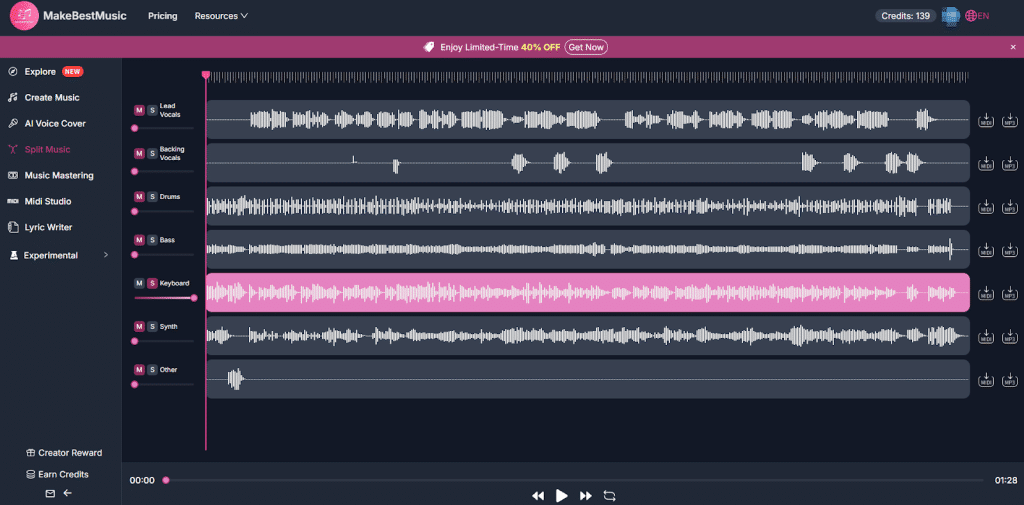
With the Split Music feature, you can upload generated or downloaded tracks for precise, structure-level adjustments. The system splits songs into up to 12 independent audio tracks, including core elements like Lead Vocals, Backing Vocals, Drums, and Bass, putting full control of every sonic layer in your hands.
Each isolated track supports independent volume adjustment via left-side sliders, plus one-click mute (M) or solo (S) modes to pinpoint sections for refinement quickly. Every track can also be exported individually as MIDI or MP3, enabling seamless workflow integration—whether you’re swapping sounds or importing into professional DAWs for advanced mixing.
The entire process skips full regeneration, letting you refine sections and iterate through multiple comparisons efficiently. This lowers production costs while delivering high-quality, high-volume musical output.
Covers & Personas: Unlock New Ways to Personalize Your Music
- AI-Crafted Unique Voice: Be the Lead Singer of Your Own Tracks
MakeBestMusic’s Persona technology goes far beyond simple voice cloning. Using deep AI learning, it analyzes your vocal frequency, distinct breathing rhythm, and signature intonation to extract your one-of-a-kind vocal traits.
- Extract Your Voice, Breathe Soul into Every Melody
MakeBestMusic’s AI extracts your vocal signature and layers it over any lyrics or melody like a custom “vocal skin”. Even without professional recording gear or polished singing skills, the AI replicates your voice naturally and authentically for highly distinctive tracks.
With MakeBestMusic, you don’t just create original songs—you perform them in your very own voice.
- Complete Creative Loop — Host Your Own Concert
Just click the +Persona button at the top of the Create Music interface. If you’ve already uploaded your voice and generated your custom persona, you can use the model directly by selecting it under My Persona with one click. If you haven’t uploaded a voice sample yet, simply click the add icon in the top right corner to upload and quickly build your unique vocal persona.
Thanks to MakeBestMusic’s user-friendly download feature, your fully original songs can go anywhere with you. Imagine downloading and playing the track you wrote—and performed in your own voice—turning your car into a private, immersive space for your very own mini concert.
- Auto Vocal Replacement: One Person, A Full Team — Boost Content Production Efficiency
For video creators and game developers with ongoing content needs, the integration of MakeBestMusic’s Persona and AI Voice Cover represents more than a technical breakthrough—it unlocks transformative productivity, saving creators time and effort while remaining incredibly easy to use.
- Massive Time Savings
Previously, replacing vocals in an audio track often required re-recording, re-editing, and realigning visuals and rhythm—this was not only time-consuming but also likely to disrupt your release schedule. By combining MakeBestMusic’s +Persona and Cover features, you can achieve automatic vocal replacement with just a few clicks, and the process is incredibly simple.
Upload & Auto-Recognize: On the AI Voice Cover interface, you can upload the audio you want to replace—whether it’s an existing vocal recording or voiceover material. Simply upload the target audio to the upload area under Audio file to be covered; direct drag-and-drop from your computer folders is fully supported.
One-Click Replacement: Next, select your desired vocal timbre in the Cover Audio Timbre panel. You can either use the trained model from your uploaded voice under My Voice or choose from public voice models in Public Voice. These include renowned singers from the US, Japan, South Korea, and more, with diverse genders, languages, and genres to pick from. Finding the right model is effortless—all voice models in MakeBestMusic’s public library support online previews. Just click the play button on the cover to listen and judge each vocal style.
- Boost Content Reusability
Multi-Style Generation: MakeBestMusic can quickly generate multiple vocal versions from a single finished audio asset. These can be adapted for different character settings, account matrices, or platform distribution strategies, enabling a “one source, multiple outputs” production model. This maximizes the value of your assets while significantly reducing overall production costs and time investment.
Remixing & Secondary Creation: Paired with MakeBestMusic’s Split Music multi-track isolation feature, creators can not only swap lead vocals but also independently adjust the volume and effects of backing vocals, drums, bass, and other individual tracks. You can even export MIDI or MP3 files for further secondary production.
This lets you easily transform a single song or voiceover into mood mixes, genre variations, character versions, or localized editions. It greatly boosts asset utilization and creative flexibility while reducing costs from repeated recording and editing.
From short videos and frequently updated virtual character projects to multi-character narrative video productions, MakeBestMusic helps creators deliver high-quality, multi-version iterations and scalable content efficiently—maximizing the value of every asset.
- Elevate Video Performance
Let Character Voices Power Your Work: Upload audio of your game protagonist’s voice to the Persona module for model training, and you’ll create a dedicated voice asset. Then use the Cover feature to import existing songs or dialogue with one click—turning plain audio tracks into personalized performances by your character. This preserves the original melody and rhythm perfectly while giving your content exceptional distinctiveness.
Break the “One-Size-Fits-All” Audio Bottleneck: Generic, emotionally flat voices in content creation often lead to audience fatigue. With custom character voices, listeners instantly grasp personality and context. Replacing generic vocals with unique character lines delivers a standout auditory experience, boosting originality and professional polish.
Immersion-Driven, High-Performance Engagement: High-quality, recognizable audio is key to retaining audiences. Richer character expression and deeper immersion drive stronger emotional connection and viral sharing. This audiovisual differentiation increases watch time, engagement, and overall audience retention.
Summary: Let AI Be Your Music Creation Assistant
In the era of AI-assisted creation, what truly sets creators apart is not just musical expertise but the ability to choose and leverage the right AI tools efficiently.
As an all-in-one AI music creation platform, MakeBestMusic offers a complete workflow from beginner to advanced levels—from text-to-song generation and multi-style tag blending, to For You pattern imitation and inspiration discovery in the Explore community. It makes creation both highly efficient and fully controllable.
For efficiency, it generates multiple full song versions at once, enabling quick side-by-side comparison and finalization. With Split Music’s multi-track separation and export, users can refine tracks at the structural level and remix content, greatly boosting asset reusability.
For vocal customization, the Persona and Cover features let you craft unique voiceprints and automate vocal replacement, supporting multi-character, multi-version output—ideal for high-frequency updates and matrixed content production.
If you want to speed up output without compromising quality and build a distinctive sonic identity for your works, MakeBestMusic is a must-adopt tool. The earlier you integrate AI into your creation workflow, the stronger first-mover advantage you’ll gain in the competitive content landscape.