

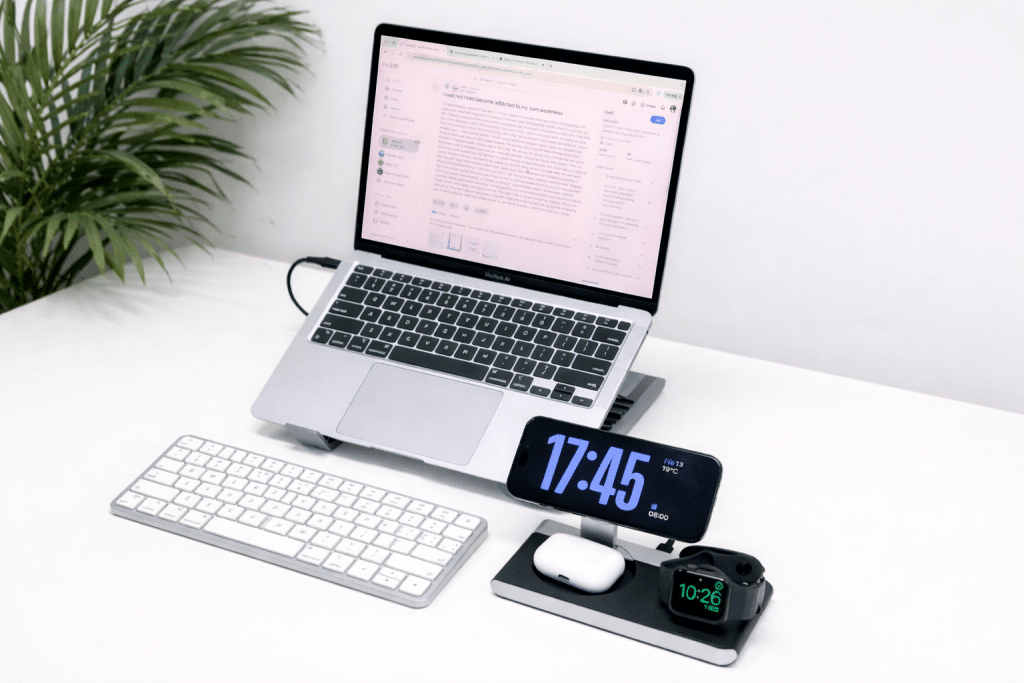
The workplace today is far different from what it a few years ago. The flexibility, productivity and work-life balance that hybrid working offers are the reason it’s no longer a fleeting trend, but a new, permanent normal for professionals who appreciate both. In today’s world, where most people are working from home, traveling between different coworking spaces, or even working remotely and in the office, there are a variety of mobile office options that can greatly improve your efficiency on a day-to-day basis. The right remote work desktop design can help you stay focused, organized and comfortable, wherever you are.
A mobile office setup is essential for a number of reasons
Distractions, inconsistent working environments and lack of suitable equipment are but a few challenges that hybrid professionals typically face. Working remotely doesn’t come with the perks of having an office, so it’s up to you to ensure you work efficiently. A mobile office avoids this issue by enabling you to take all the necessary equipment with you wherever you go, while keeping your workspace tidy and productive at the same time.
A good remote work desktop setup helps to increase focus, decrease physical stress and keep workers connected to their teams or clients. Most significantly it establishes uniformity. If you use the same tools and workflow at all your sites, productivity will benefit as well.
Use the appropriate laptop or portable computer
The first part of any mobile office is a reliable computer. You’ll want your laptop to be lightweight, quick, and efficient, and to run smoothly throughout your workday. Designers, content creators, video editors, and software developers might need high-performance machines with more RAM and processors. However, battery life and portability are likely to be important for general office users.
A thin laptop stand can also raise your screen to eye level, which helps to prevent neck pain and bad posture. Computer desk accessories such as a wireless keyboard and mouse make your temporary work place a professional workspace.
To create a desktop environment for a remote workplace, go for both performance and portability. A mobile office should be easy to walk around with, while still being productive.
Use a Portable Monitor to Help You Get More Done
The foremost problem that remote employees encounter is the space of the screens. Portable monitor enhances workflow management and multi-tasking in a second. Businesses can have their communication applications running on one screen and their document, spreadsheet, or creative work applications on the other.
Portable monitors are compact and lightweight, with an easy-to-connect USB-C or HDMI port. They can be carried in almost any laptop case, and offer a desktop experience anywhere you go. This accessory can help improve efficiency and comfort for hybrid employees who move back and forth between the office and home.
The Mukiya USB-C Laptop Dock Stand provides a smart and efficient solution for professionals seeking a cleaner, more organized workspace.
When the second display is added to a remote work desktop environment, it helps to keep us organized but also a lot less tab and app switching.
Design an ergonomic workspace, anywhere!
Long periods of work require focus, which is provided by comfort. When employees sit poorly or in an uncomfortable chair, their productivity is quickly lost and they become physically uncomfortable. In any temporary work, ergonomic accessories can help to make a healthier environment.
A foldable laptop stand, an ergonomic compact keyboard, and a wireless mouse are great accessories for a mobile office. For those who need to focus on their work, noise-canceling headphones can be an excellent choice, particularly in areas with high background noise such as offices or cafés.
Lighting is important, too! Mobile LED desk lamps can help alleviate eye strain and increase lighting in late work sessions. Improvements to your remote work desktop environment are simple, doable, and can help make your desktop look more professional and efficient.
Organize Your Workspace With Smart Accessories
Organized work area prevents interruptions and distractions. It’s time for mobile professionals to maintain a clean, organized workspace with functional accessories that streamline the management of their work.
Cable organizers, portable charging stations and small storage pouches keep devices and accessories organized. A sturdy backpack or laptop bag with several compartments will be useful to protect gadgets and to make the transportation easier.
Wireless accessories and cloud storage also eliminate all of the clutter of cables around your workspace and make it more mobile. A well-designed workspace for working remotely will be efficient and free of stress thanks to organization.
Make sure there is a reliable internet connection
Access to a reliable internet connection is one of the most essential components of the success of hybrid working. Gamers are relying on high-quality connectivity for video calls, cloud-based applications and online collaboration tools. Unfortunately, public internet isn’t always secure or dependable.
Numerous professionals use mobile data backup or portable Wi-Fi hotspots to provide continuous internet connectivity. A reliable connection helps to prevent delays during meetings, and ensures smooth communication with clients and team members.
When using public networks, it is also advised to use a VPN to secure sensitive information. Security needs to be a part of your remote work desktop configuration at all times, particularly when accessing confidential business information remotely.
Make it possible to use the right software and collaboration tools
Digital collaboration platforms are key tools for modern hybrid working. Communication Tools, Project Management Software, and Cloud-Based Productivity Apps keep remote teams connected and organized.
Whether for virtual meetings, project management, or cloud-based document sharing, these applications ensure that collaboration is simple and intuitive, even when working from a distance. You can access important files and keep working without interruptions when you sync your devices.
Automation tools can also help save time by automating repetitive tasks. Webinars are a great way to improve the usability and efficiency of remote working desktops, whether you are an independent professional or a remote team.
Focus on Power and Battery Management
Running out of battery power at a critical meeting or deadline can throw off your whole workflow. It is important that mobile workers always have the necessary charging equipment with them so that they can avoid disruptions.
Portable power banks, universal adapters and mini extension cords are great to have on hand for a mobile office. Long battery life is also important when it comes to spending less time plugged in to charge when out and about or traveling.
Having a reliable power strategy can make sure that your remote work desktop setup is operational all day, wherever you are.
Maintain Work-Life Balance in Hybrid Work
A challenge of working from home is being able to differentiate between work and home. If there is no boundaries, burnout can easily develop. Your workspace should be productive and support mental health.
Set up schedules to establish boundaries for work and play. If possible, clear away the mobile office after work hours, to establish a clear boundary between work and leisure. Regular breaks are also important for long-term productivity, along with maintaining healthy habits.
The ideal remote work desktop setup should boost productivity AND work habits and well-being.
Conclusion
Having a laptop is not enough to create the ultimate mobile office. The Mukiya best hybrid workspaces are easily portable, comfortable, organized and technologically sound, providing the professional workplace experience wherever you go. Whether it’s portable monitors, ergonomic accessories, secure internet connections or productivity tools, each element contributes to improved performance and focus.
With hybrid work on the rise, smart remote work desktops are enabling professionals to enjoy greater flexibility, efficiency, and work satisfaction. This will help you to remain productive and successful wherever you go with your work, by designing a workspace that will help you concentrate and be able to move around without any problems.
Let’s put hybrid work behind us. Embrace simplicity. Embrace focus. Start here, embrace Mukiya today.
Shop all MUKIYA products for 15% off using “WORKSAFE” at checkout!
To find out more, please check our landing page.