

When we find ourselves amidst the roaring crowds of a music festival or immerse ourselves in the meticulously crafted electronic beats through our headphones, a complex emotion often wells up—a mix of awe and longing. We yearn to create our own sound, yet we are held back by the formidable barriers erected by professional recording studios, expensive hardware, complex music theory, and intricate software.
However, an AI-driven creative revolution is quietly unfolding, and in the past, producing electronic dance music with basic professional quality required producers to simultaneously fulfill multiple roles: composer, arranger, sound designer, mixer, and mastering engineer. Today, AI music generation platforms like MakeBestMusic are digitizing and streamlining these roles. They are no longer just a collection of cold tools, but invisible professional partners, encapsulating complex technical processes into intuitive user interfaces.
Redefining Perception: How AI is Reshaping the EDM Production Process
In traditional EDM production, the workflow is divergent and cyclical: you might tweak melodies while designing sounds, rearrange structures during mixing, and the entire process is fraught with uncertainty and high learning costs.
Song mashup maker is revolutionary in that it linearizes, modularizes, and results-oriented the process. Take MakeBestMusic as an example—it builds a clear “creative pipeline”:
- Creative Textualization(Lyrics Generator): Transform vague feelings into concrete lyrics and themes, providing an unshakable “creative blueprint” for all subsequent steps.
- Blueprint Audioization(Create Music): Transform text-based musical blueprints into complete musical structures encompassing melody, harmony, rhythm, and fundamental timbres with a single click.
- Voice Personalization(AI Voice Cover): Infuse the work with distinctive personality traits and emotional intensity.
- Professionalization of Works(Music Mastering): Delivering commercial-grade sound quality and a competitive edge to finished products.
The ingenuity of this workflow lies in how each step addresses a core pain point in traditional production, with the output of one stage seamlessly becoming the “fuel” for the next. This significantly reduces decision-making burdens, allowing creators to stay focused on the creative process itself.
Four Practical Steps: The Birth of Your First EDM Single
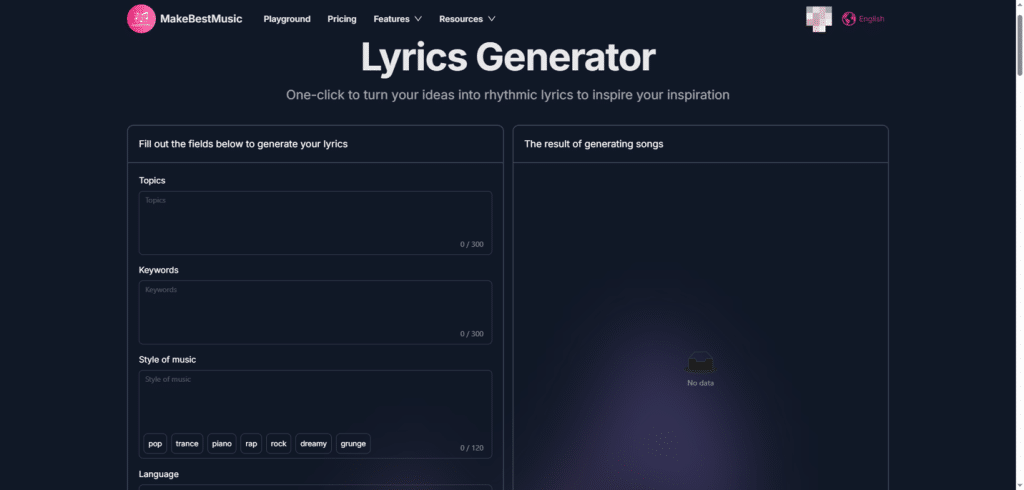
Step 1: Laying the Foundation—Solidify inspiration into a “Creative Blueprint” within Lyrics Generator.
Many mistakenly believe EDM doesn’t require lyrics. On the contrary, even if the final piece is purely instrumental, a clear lyric or thematic description serves as the most powerful instruction for guiding AI to generate music that matches the intended emotional tone. It determines the soulful foundation of the work.
Define Core Topics:
- Don’t write “a happy song.” Be specific and evoke a scene. For example:
- Pursuit of Liberation: “Escape and Resonance in Urban Underground Clubs”
- Visual Imagery: “Hovercrafts Racing Through a Cyberpunk Rainy Night”
- Emotional Expression: “A Journey of Self-Rebuilding After Broken Relationships”
- This theme will run throughout your entire creative work.
- Don’t write “a happy song.” Be specific and evoke a scene. For example:
Inject Key Imagery (Keywords):
- This is the key to making the theme “visual” and “sensory.” Provide 3-5 highly condensed words that will directly influence the “tonal pigments” and “rhythmic strokes” of the generated music.
- Example Combination:
- Theme: “Cyberpunk Rainy Night” + Keywords: Neon pulses, synth waves, mechanical rhythms, damp reverberations, chaotic bass
- Theme: “Journey of Self-Rebuilding” + Keywords: Shattered glass, intensifying light, sparse piano, heartbeat rhythms, soaring strings
- Select Style and Language:
- In the Styles section, explicitly select “Electronic” or more specific subgenres like “Synthwave” or “Ambient Electronic.” This defines the broad scope for the AI’s exploration.
- Select the language you need in Language.
Generate and copy:
- After clicking Generate, you’ll receive lyrics brimming with rhythm and vivid imagery. Please copy this entire text. It’s not just lyrics—it’s a fully functional creative brief packed with emotion, rhythm, and structural cues.
Step 2: Build — In Create Music, turn blueprints into audible reality.
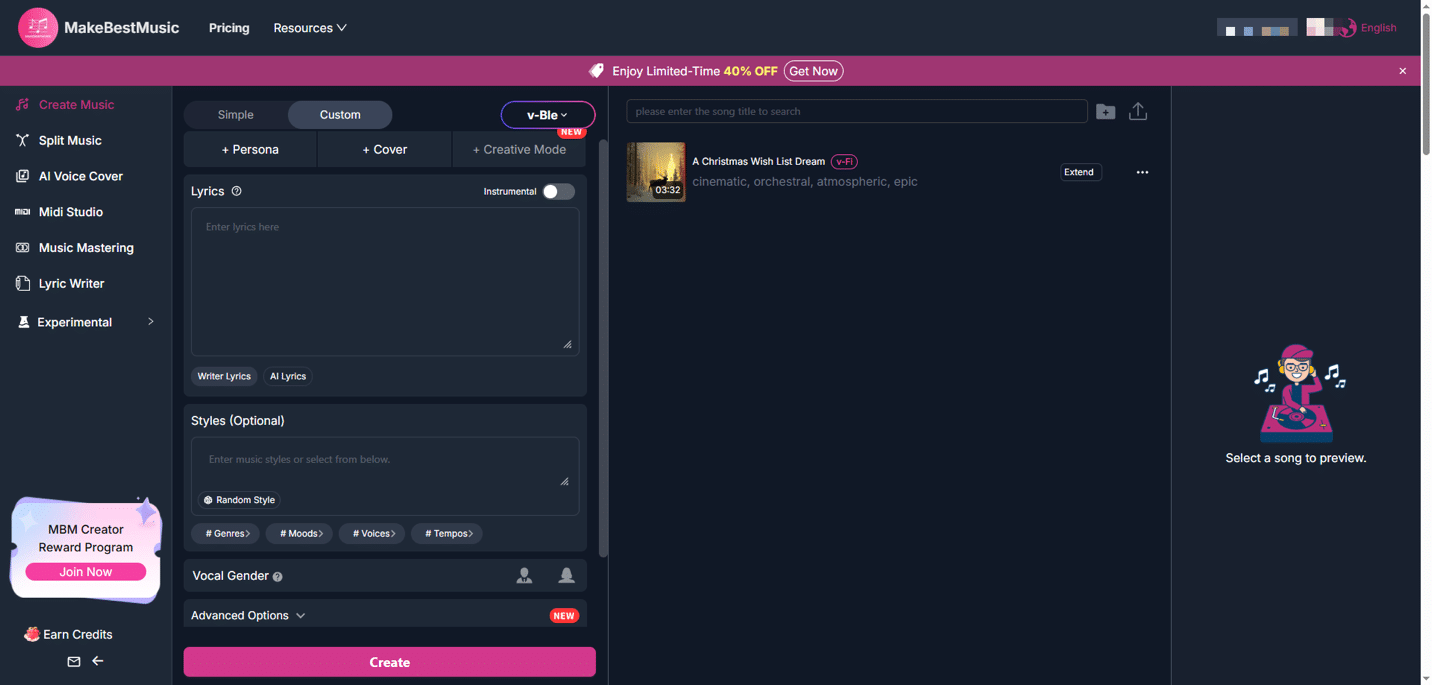
This is the core process where magic happens. You will witness firsthand how words give rise to sound.
Paste lyrics and input commands:
- Paste the lyrics copied in the previous step into the lyrics box in Create Music. This ensures the generated melody’s fluctuations naturally align with the rhythmic patterns of spoken language.
- In the description box, you need to issue more precise arrangement instructions using “language AI can understand.” This requires a bit of skill:
- Basic framework instructions: A dynamic and emotional future bass track with a euphoric drop.
- Structural Refinement: The structure should be: atmospheric intro (30s) -> verse with vocal chops -> intense build-up with risers -> huge, melodic drop -> breakdown with ambient pads -> final drop with more percussion.
- Timbre Reference: The synth lead should be bright and piercing, like in the music of Illenium. Use a deep, side-chained bassline to drive the rhythm.
Key Parameter Settings:
- Genre: This is one of the most important settings. If you want:
- Powerful 4/4 beat drive: Choose “House” or “Progressive House”.
- Pounding bass and syncopated rhythms: Choose “Dubstep” or “Trap”.
- Elegant melodies and soaring explosions: Choose “Future Bass” or “Melodic Dubstep”.
- Tempo(Speed, BPM):
- House / Progressive House: 128 BPM
- Dubstep: 140 BPM
- Future Bass: 150 BPM
- Synthwave: 80-100 BPM
- Mood: Select “Energetic,” “Epic,” “Melancholic,” etc., to fine-tune the overall color scheme.
- Genre: This is one of the most important settings. If you want:
Generation, Preview, and Iteration:
- Click Generate, and the system will typically deliver results within 2-3 minutes. Listen with an open yet critical ear:
- Does the climax (Drop) section maintain sufficient tension and memorable moments?
- Are the transitions between paragraphs seamless?
- Does the overall emotional tone align with your original intent?
- Golden Rule: Don’t expect perfection on the first try. Use the “Generate Multiple Versions” feature to conduct A/B testing. You can also fine-tune the prompt (e.g., changing “huge drop” to “more aggressive drop”) and generate again. This is a process of “communicating” and “working together” with the AI.
- Click Generate, and the system will typically deliver results within 2-3 minutes. Listen with an open yet critical ear:
Step 3: The Finishing Touch—Infuse Your Work with Personality and Warmth Using AI Voice Cover
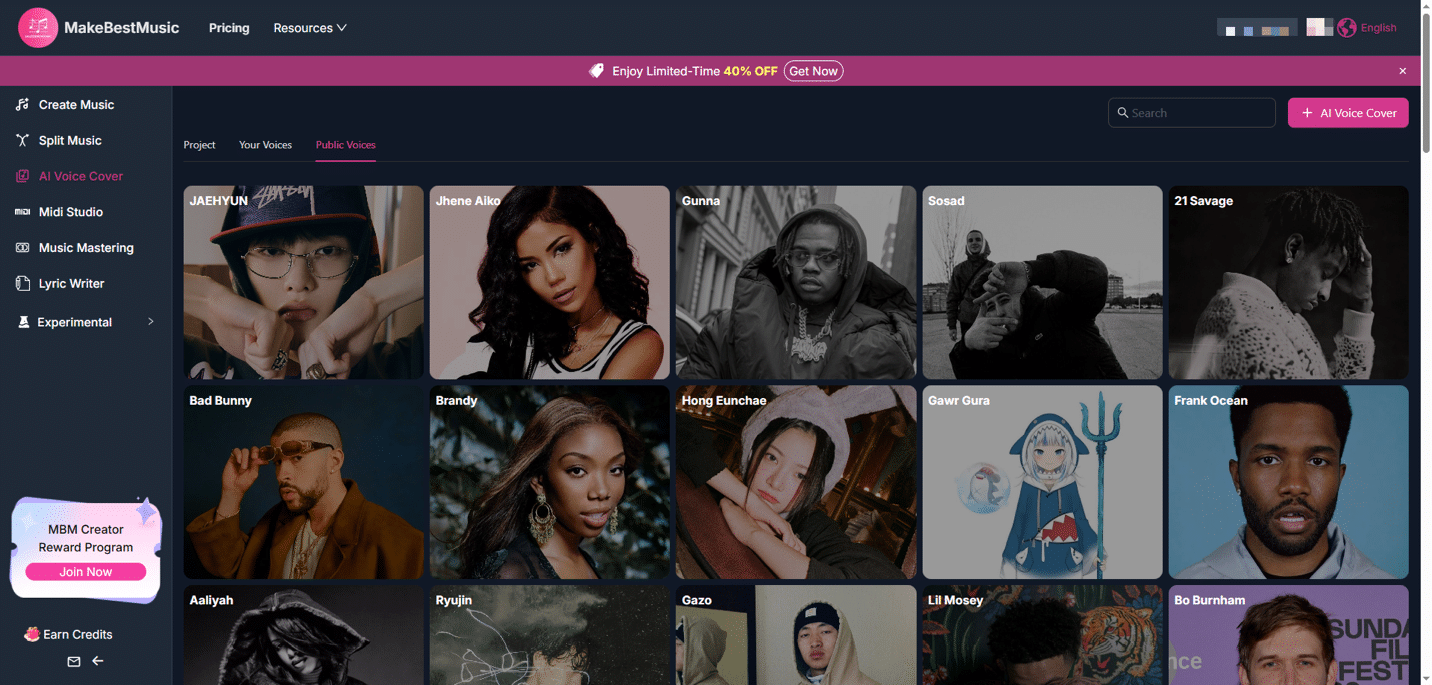
The human voice serves as the most direct bridge between listeners’ emotions. Even when a voice has already been generated through the preceding steps, the AI Voice Cover feature can elevate it, customizing it into a more distinctive and iconic sound.
Importing and Selecting Voice Tracks:
- Import the music piece finalized in Step 2 into AI Voice Cover。
- In the voice library, select the perfect sound for your EDM subgenre:
- Future Bass / Melodic Dubstep: Opt for a clear, infectious, slightly breathy “Pop Female Vocal” voice to highlight the melody’s beauty.
- Hard Dubstep / Riddim: Choose a grittier, grainier, or robotically processed “Metalcore or Experimental Vocal” voice to match the music’s intensity.
- House / Pop EDM: Opt for warm, rhythmically driven “R&B male vocals” or “vibrant female vocals.”
Transformation and Fine-Tuning:
- After one-click conversion, the AI not only alters the vocal timbre but also intelligently adjusts performance details—such as amplifying power during climaxes and adding natural breath sounds between phrases.
- Use the provided simple sliders (e.g., “Brightness,” “Thickness”) for final tonal refinement, ensuring vocals blend seamlessly with the accompaniment rather than sounding detached.
Step 4: Refinement—Achieve Arena-Level Sound Quality Through Music Mastering
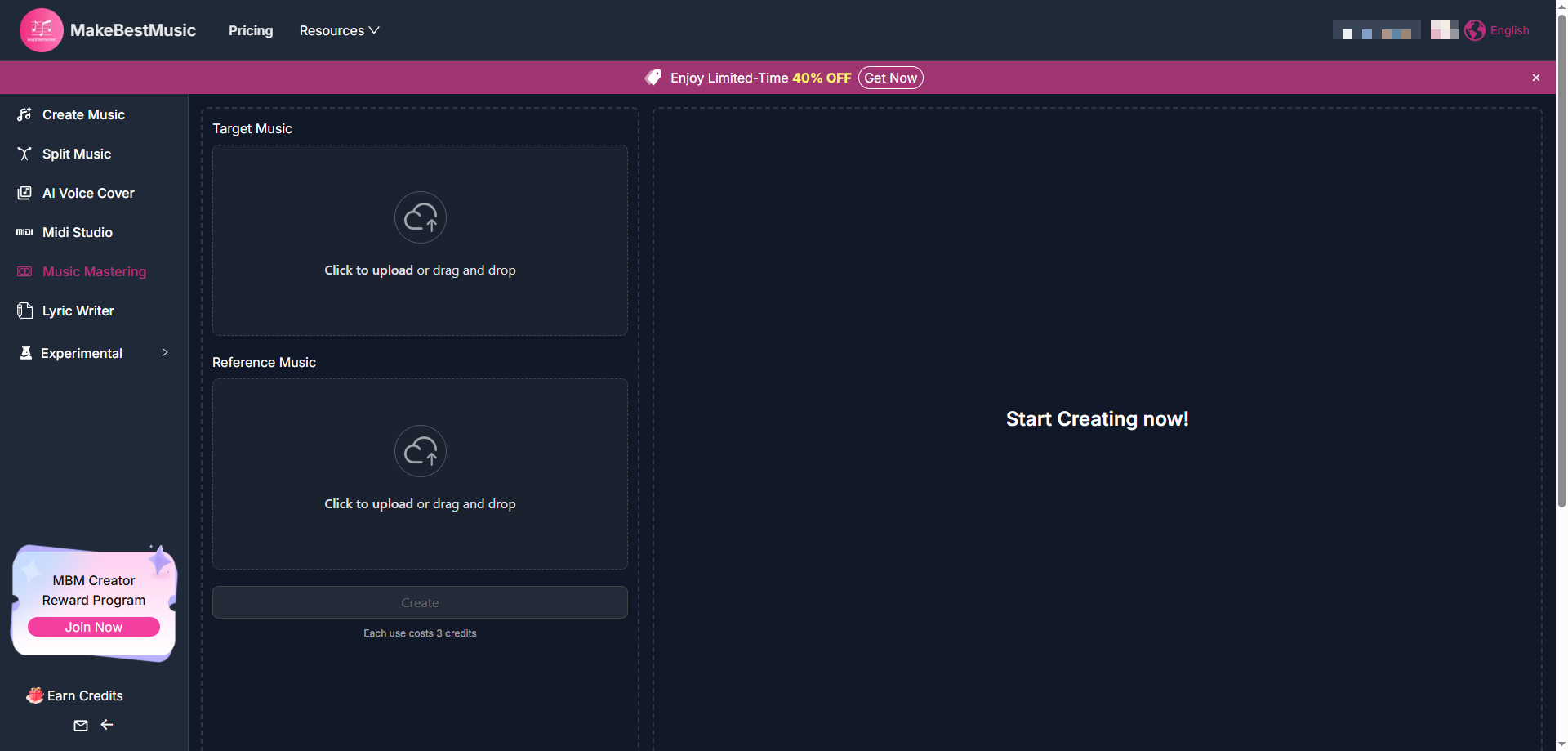
Music that hasn’t undergone mastering is like an uncut diamond—its potential remains hidden. Mastering is the final, crucial step that ensures your work maintains its power, clarity, and professionalism across any playback environment, from phone speakers to massive club sound systems.
Upload Target and Reference:
- Upload your vocal-optimized track as Target Music.
- The key lies in selecting the Reference Music. You need to find a commercially released EDM track that you deeply admire for its sound quality and shares a similar style.
Understanding What AI is Doing:
- After you upload your reference track, the AI mastering engine performs a deep spectral analysis to learn its:
- Loudness: Achieve streaming platform standards without distortion.
- Frequency Balance: Ensure deep bass without muddiness, clear midrange vocals, and bright treble without harshness.
- Dynamic Range: Maintain impact while allowing the music to breathe.
- Stereo Image: Distribute sound artfully across left and right channels to create a sense of spaciousness.
- Subsequently, the AI intelligently and adaptively applies these learned “professional characteristics” to your Target Music. This process completes within minutes, yet simulates hours of work by a seasoned mastering engineer.
- After you upload your reference track, the AI mastering engine performs a deep spectral analysis to learn its:
Export Your Professional Finished Product:
- After processing is complete, we strongly recommend listening to both the pre-mastered and post-mastered versions using different devices (headphones, Bluetooth speakers, phone speakers). You’ll be amazed by the transformation: the mix feels tighter, louder, and clearer overall, with all instruments now neatly organized in their respective positions.
- Once satisfied, export a high-bitrate WAV or MP3 file. At this point, your very own EDM single, boasting release-ready sound quality, is officially born.
Thinking Upward: From “Making a Song” to “Developing Your Style”
Once you’ve mastered the four steps above, your creative journey will enter a new phase: how to infuse your work with more personal flair.
- Build your “prompt library”: Record which combinations of prompts consistently produce your desired effects (e.g., “growling bass with heavy distortion,” “crystalline arpeggio”). This is your exclusive dictionary for communicating with AI.
- Experiment with cross-genre fusion: Blend different styles within prompts, like “the orchestral atmosphere of a film score with the beat of deep house,” to explore unique hybrid genres.
- Leverage External Samples: Use MakeBestMusic’s generated tracks as a core framework. Import them into simple audio editing software to layer in your own unique drum samples, ambient recordings, or vocal snippets at strategic points, adding personality and depth to your compositions.
Conclusion
For every beginner looking to start creating electronic music—or any music—the hardest step isn’t learning a specific feature, but overcoming the fear of sounding “imperfect” or “unprofessional.” Remember, every amazing musical journey begins with something simple, even clumsy. The entire meaning of your first piece lies in completing it—in fully experiencing that magical, complete cycle: from a fleeting thought in your mind to owning a song of your own that can be heard. This tangible sense of accomplishment, of building something from nothing with your own hands, is far more powerful than any external validation. It will be the eternal fuel that propels you through every creative block you encounter.
Now, open MakeBestMusic and start by entering the first word that stirs your soul into the Lyrics Generator. Your voice deserves to be heard by the world. This electronic symphony, led by you, begins with the opening notes playing right now.