

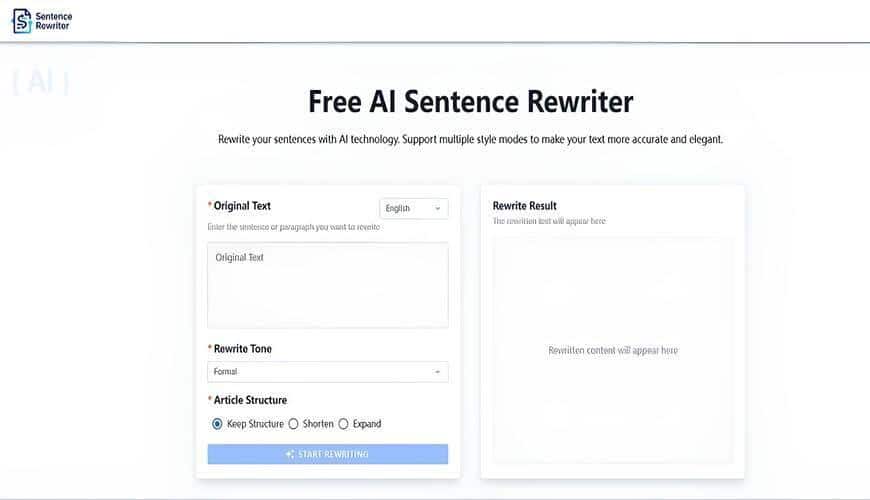
The creation of a professional document entails a draft as the initial step only. Drafts are hard to read because they often contain unclear sentences, grammar mistakes, and inconsistent tone. The process of drafting requires working on the aspects of clarity, flow, and proper sentence structure. A sentence rewriter can be of help in this matter by molding the sentences and at the same time keeping the original meaning.
The use of a sentence rewriter promotes better sentence construction, richer vocabulary, and consistent style that the writer wants. When used together with careful human revision, it can change a rough draft into a lucid and professional piece. Following a systematic approach helps writers to refine every single sentence in an efficient manner. The steps indicated below illustrate how to change a draft into a completed and refined document.
Steps to Turn Drafts into Final Documents
1. Read Your Draft
First, read your draft attentively from beginning to end to grasp the content completely. Pay attention to the key points, organization, and style, and at the same time, look for unclear or redundant sentences. Point out where the wording is strange or where the readers may get lost. This first reading is the groundwork for the rewriting and editing process to be done effectively.
Having the draft read from a reader’s viewpoint lets you see where the text is not clear or where there might be faulty reasoning. Make a list of clauses that need attention due to lack of clarity and that will, therefore, need either rewriting or revision for better understanding. Knowing the draft’s good and bad sides will help you choose the right moment to use a sentence rewriter. Such a thorough evaluation is what guarantees a refined end document.
2. Highlight Problem Areas
Once you have read the draft, proceed to highlight those sentences and paragraphs that need clarity or better structure. Also, search for grammar errors, redundant expressions, or vague wording that could mislead the reader and thus mark them as well. Highlighting your work in this way will make sure that you first attend to the most important issues during your rewriting process.
In marking the problem areas, you will also be able to see which parts have been worked on during editing. This step prevents the change for clarity and effectiveness to be applied to the already clear and effective sentences. Concentrating on the weaker spots enables the sentence rewriter to be used in a way that maximizes its benefit.
3. Choose a Sentence Rewriter
Sentence Rewriter is the truly genuine and user-friendly tool for the editing process, which provides various rewordings for each sentence, thus making drafting easy. It definitely enhances the text in terms of its clarity, grammar, and style without any loss of its original semantics. This feature renders it suitable for those who want to get their rough drafts done fast and have them looking like final documents.
Integrating Sentence Rewriter in your workflow introduces the great advantage of all the suggestions being perfectly aligned with the content’s aim and target audience. In case you are dealing with academic papers, business reports, or even fiction, this instrument will be your time saver and will make the whole editing process easier. It will give you the power to upgrade your sentences in a very short time and still let their original meaning be comprehended.
4. Input Your Draft
Add your full draft text to the sentence rephraser with proper formatting. Correct formatting is important to analyze each sentence helping prevent errors in rewriting. Context-driven means the suggestions will be contextually coherent.
A full draft helps the tool to understand the flow of ideas across sentences and paragraphs. With contextual rewriting, the reading and style remain uniform in the document, which greatly increases the readability and maintains coherence in the later manuscript.
5. Set Tool Parameters
Make the sentence rewriter settings fit your document’s tone, style, and conciseness. Depending on your objectives, select formal, casual, or professional outputs. Proper configuration guarantees that the suggestions made are specifically for your document and are thus relevant.
Right configuration will not allow the system to suggest generic or mismatched sentences. It will help to preserve uniformity throughout the text while at the same time making the words flow naturally and easily read. Adjusting the parameters at this point will make the process of rewriting quicker and produce quality results in an efficient manner.
6. Run the Tool
Utilize the sentence rewriter to produce different wordings for your sentences. The tool assesses grammar, sentence structure, and readability to propose enhancements. This phase instantly converts clumsy or vague sentences into refined substitutes.
Employing machine-based rewriting assists in pinpointing poor or repetitive sentences which could have been neglected. It accelerates the revising procedure and at the same time, maintains the exact message. The proposed changes serve as a base for additional human scrutiny, which will result in a final professional draft.
7. Review Suggestions
Every suggestion from the paraphrase tool should be evaluated thoroughly to clarify and preserve the meaning. Sometimes, the suggestions do not match your context, thus it is imperative to go with the ones that suit your message. Consider tone, style, and readability when dealing with each sentence.
Observe the flow of the new sentences inside the paragraph as well as throughout the document. Make it a point to keep the transitions smooth and the logical connections intact. Careful review assures that the overall coherence and professionalism in the final draft.
8. Adjustments to Implement
Once the recommendations have been evaluated by you, the draft is to be altered in the manner that is stated above. The following are the major areas of concern:
- Clarity: The unclear or confusing statements are replaced with their exact counterparts.
- Conciseness: The unnecessary words and the phrases that do not convey any new meaning are removed and thus, readability is improved.
- Vocabulary: A more specific and varied lexicon is used to attract the reader’s attention and make the writing more vibrant.
- Sentence Flow: If required, move the sentences around to obtain smooth transitions and logical development of ideas.
- Paragraph Cohesion: Change the paragraph layout to help with the mixing of the ideas that are related and the flowing of them in the natural way.
The process here is to use both the machine suggestions and the human discernment to sharpen the words and the paragraphs up, thus assembling a united and professional paper.
9. Final Proofreading
After making all modifications, the complete text should be red by the grammar, punctuation, and clarity aspects. One can identify difficult expressions or phrases as well as parts that may hinder the reading by doing this through the reading aloud method. Check the formatting and see to it that all the elements of the document are consistent and of professional quality.
Now, at this point, one can also take advantage of AIVector for improving the quality of the images included in the paper. Instant conversion of PNG files into SVGs is done, thus making the graphics epically sharp and scalable. The merging of refined text with bright, large-quality images gives the whole document a look that is both polished and professional.
10. Confirm Polished Quality
The document does not need any more checks, as the last round proofing will surely yield only good results and nothing else. The text is easy to read and understand from the point of view of the intended audience.
A finished and perfect document is to be professional, interesting, and without any mistakes. Make sure every single statement makes the ideas clearer. Your draft has been scrutinized carefully and has thus become a final, polished, high-quality document.
Final Thoughts
The changeover from a draft to a final document is a multi-step process that involves both the application of automated tools and the assessment by human reviewers. The application of a sentence rewriter is very beneficial in the treatment of sentences and ensuring their coherence throughout the document. The approach of working through the prescribed steps ensures that each and every section of the draft is reviewed, rewritten, and polished in an orderly manner.
The use of a sentence rewriter is a time saver and at the same time, writing quality is improved. It is a tool that helps the writers to produce their work in a very efficient manner that is clear, coherent, and of professional quality. The activity of assessing drafts, applying revisions and doing final proofreading can be done by writers who then consistently produce high-quality documents that convey their ideas effectively.