

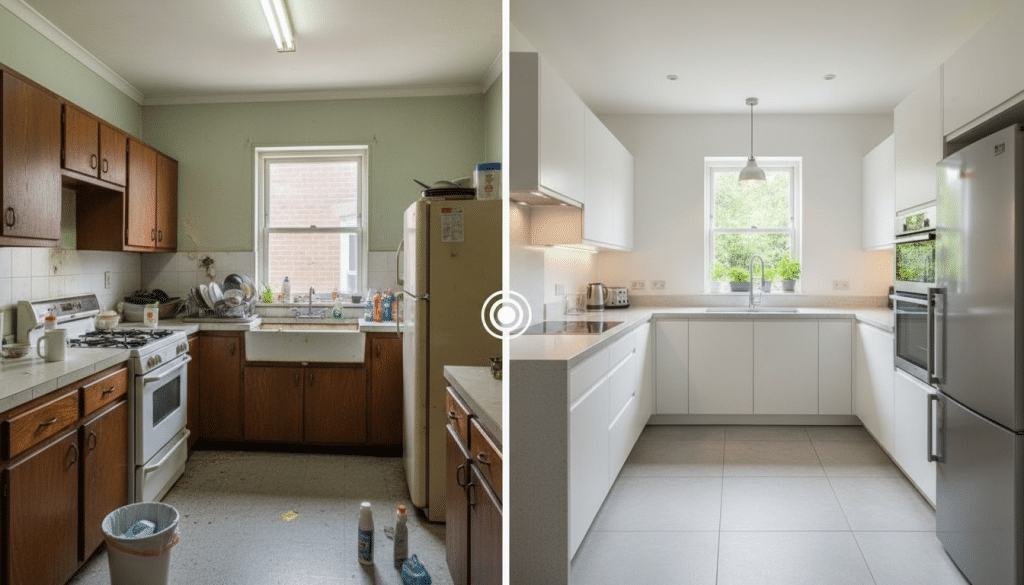
Reworking a living space often requires translating vague ideas into concrete visuals. VDraw provides a streamlined approach that connects raw room photos with accurate design variations. By grounding every output in real spatial context, its AI Room Design system gives users immediate, usable results without unnecessary complexity.
Building Design Concepts on Real Spatial Inputs
Starting Every Concept with an Uploaded Room Image
Effective room visualization begins with the actual space. VDraw requires users to upload a room-related photo before generating any result. This can be a simple sketch, a bare concrete room, or a lived-in space awaiting renovation. The system interprets structure, lighting, and layout, ensuring that every variation reflects the true proportions of the room. This foundational step eliminates the guesswork common in generic room renderings and establishes a practical base for all design outcomes within AI Room Design.
Applying Ready-Made Styles for Fast Iteration
After the initial image is uploaded, users can apply a predefined style to quickly test design directions. A homeowner exploring modern minimalism, for instance, can view a clean, light-filled version of the same room within seconds. Because the visual changes are applied directly onto the uploaded space, the results are not abstract concepts but realistic projections. This allows users to make decisions faster and narrow their preferences without multiple rounds of manual editing.
Expanding Control Through Prompt-Based Adjustments
Directing Details with Optional Text Instructions
Some users want more control than style selection alone. VDraw accommodates this by allowing optional text prompts that refine mood, materials, and lighting. A user might request “a warm, soft-lit study with natural textures,” and the system applies the instruction while preserving the room’s original structure. This hybrid workflow—mandatory photo input plus optional description—keeps the process efficient while still enabling custom variations. Each iteration stays grounded in the logic of the existing space, which makes AI Room Design particularly reliable for practical planning.
Handling Rooms in Early Renovation Stages
Raw or partially built rooms are often difficult to visualize. Sending contractors sketches or floor plans can introduce ambiguity. With VDraw, users can upload construction-phase images and instantly explore working concepts such as zoning, lighting plans, or stylistic transformations. This approach turns early-stage environments into workable visual materials and helps users identify functional possibilities before committing to physical changes.
Enhancing Supporting Visual Assets
Cleaning Reference Media for Clearer Workflows
Interior projects often involve collecting images or clips from various sources. These materials sometimes include marks that disrupt comparison or presentation quality. To keep visual sets clean, users can turn to VDraw’s Video Watermark Remover. While separate from AI Room Design itself, this tool ensures that reference media remains polished and usable across planning, pitching, and content production. It supports a smooth workflow by eliminating distracting elements from key visual resources.
Refining AI-Generated Outcomes with Editing Tools
Once variations are produced, some users prefer light adjustments before sharing results. VDraw’s built-in editing allows changes to lighting, tone, and texture without toggling to other software. A designer preparing multiple versions of a compact living room can fine-tune brightness or surface detail directly on the platform. This integrated editing step reinforces a direct, end-to-end workflow that minimizes friction and accelerates output.
Applying AI Room Design to Real-World Decision Making
Supporting Clear Communication During Home Improvement
Homeowners often struggle to articulate design preferences. AI Room Design resolves this by generating visuals that communicate intentions clearly. When one user needed to explain a layout change to a contractor, the system’s variations provided straightforward references. The visuals aligned expectations early in the conversation and reduced the need for repeated clarification. Practical decision-making became simpler because the concepts were visually anchored in the actual room.
Helping Content Creators Produce Consistent Visual Output
Creators who publish renovation or design-related content often need multiple variations quickly. By uploading a single image and generating diverse styles, they can produce content sequences that appear cohesive and intentional. This speed benefits creators who rely on consistent publication. It also helps them test multiple ideas without committing to elaborate design tools or lengthy manual editing cycles.
Guiding Long-Term Planning for Evolving Spaces
Some users approach interior design with future needs in mind. For example, a growing family might explore how a spare room could transition into a nursery or study. By generating several design directions from the same uploaded photo, they gain visual clarity on long-term possibilities. These practical outputs provide a reliable basis for budgeting, planning, and priority setting.
Why VDraw Provides Reliable Visual Outcomes
Structurally Accurate, Room-Specific Variations
Because every result stems from the uploaded image, VDraw avoids producing generic or unrealistic layouts. Window placement, wall depth, and room geometry stay intact. This structural fidelity is the core reason AI Room Design is valuable for users seeking results that can be implemented in real life. The system produces visuals that function not only as inspiration but also as grounded references.
A Condensed, Purpose-Driven Workflow
Traditional design tools require switching between rendering apps, editing platforms, and exploration interfaces. VDraw consolidates these steps into a single environment. Users can upload a room, generate variations, refine details, clean reference media, and prepare final concepts without leaving the platform. This focused workflow minimizes distraction and accelerates decision-making, which aligns perfectly with users who want results instead of complexity.
Conclusion: A Straightforward Solution for Turning Real Rooms into Clear Visual Concepts
VDraw provides a practical, concise path to exploring room improvements. Its combination of required image input, selectable styles, and optional prompt refinement allows users to shift from raw room photos to actionable visuals in minutes. Across use cases—from renovation planning to content creation—AI Room Design offers results that are fast, grounded, and usable. For anyone aiming to simplify their design workflow while improving clarity, VDraw delivers an efficient and dependable solution.