

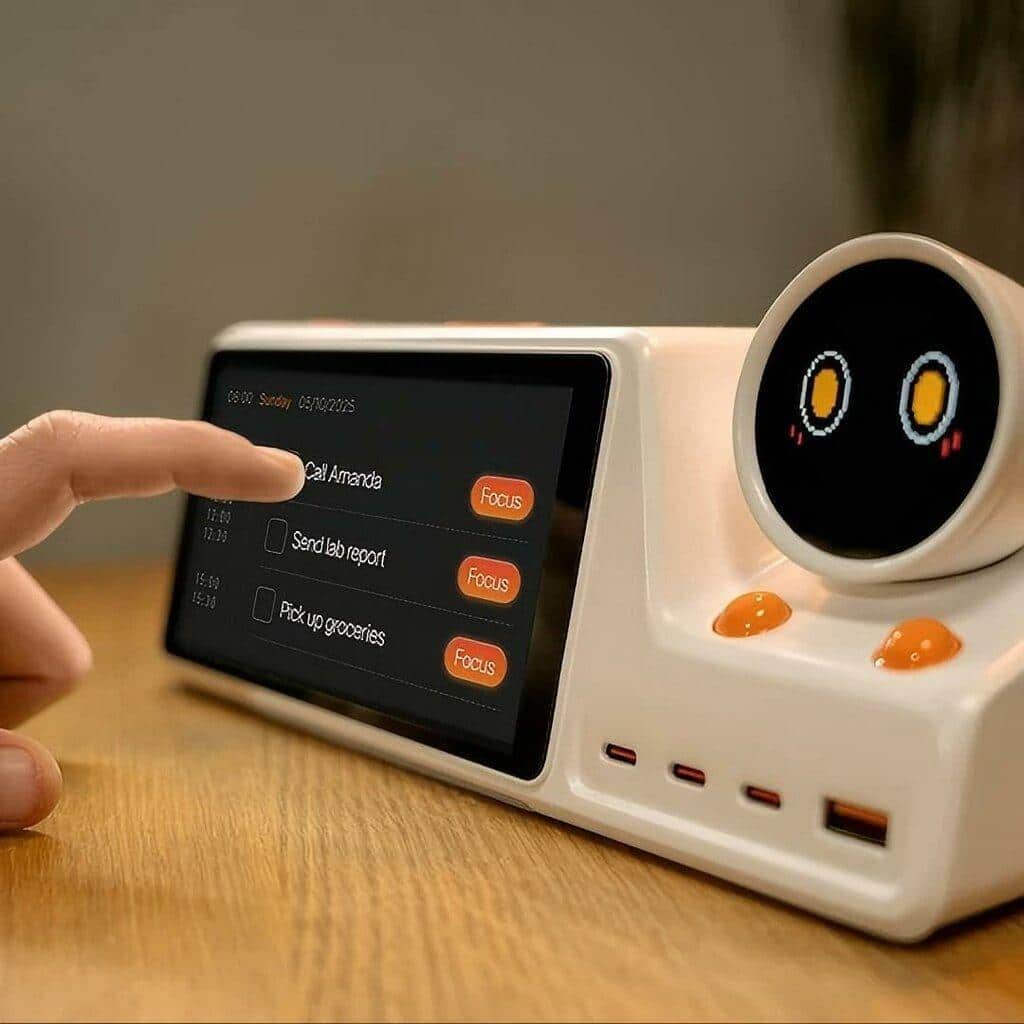
ZIEA One turns scattered schedules, tasks, and distractions into a clearer desk-based workflow built around your next actions.
ZIEA One helps people move through the day with less friction. Instead of forcing users to constantly check calendars, task apps, reminders, and focus tools separately, it brings the most important parts of daily execution into one physical desk device.
ZIEA One helps users understand what needs to happen next by combining calendar sync, AI planning, Next 3 action visibility, voice scheduling, Deep Focus Mode, and a physical desk hub.
It Brings Your Calendar Into View
ZIEA One syncs with major calendar platforms, including Google Calendar, Apple Calendar, and Outlook Calendar. This allows your schedule to become part of your physical desk environment instead of staying hidden inside a phone or computer.
That matters because calendars often tell you what is happening, but they do not always help you act. ZIEA One uses calendar visibility as the starting point for execution. It helps you see meetings, time blocks, and available work windows more clearly so your day feels less scattered.
For example, instead of opening your calendar app several times a day, you can use ZIEA One as a dedicated place to understand what is coming up and what you should prepare for.
It Helps You Plan the Day With AI
ZIEA One uses AI planning features to help turn schedules, tasks, reminders, deadlines, and open work windows into a clearer daily structure.
This is useful when your task list is technically complete but still hard to act on. Many people already know everything they need to do. The hard part is deciding what should happen first, what can wait, and how to fit focused work around meetings or deadlines.
ZIEA One helps reduce that planning burden by supporting a more guided daily workflow.
It Turns Tasks Into Next Actions
One of ZIEA One’s most important roles is helping users move from a task list to a next action.
A task list can easily become overwhelming. It may include urgent items, vague ideas, small reminders, long-term projects, and half-finished thoughts all in one place. When everything is visible at once, it can be harder to start.
ZIEA One is designed to make the next few actions more visible. Instead of pushing users to manage an entire productivity system, it helps answer a more immediate question:
What should I do next? ZIEA One’s “Next 3” design is built around this question: instead of showing everything, it helps users see the nearest few actions that are most relevant now.
This makes it especially useful during moments when users feel stuck, overloaded, or unsure where to begin.
It Lets You Create Schedules by Voice
ZIEA One supports voice-based schedule creation through the hardware device. This means users can quickly capture a new task, reminder, or event without picking up their phone.
That is a small interaction with a big practical benefit. Opening a phone to add one reminder can easily turn into checking messages, email, social media, or other apps. ZIEA One reduces that risk by giving users a more direct way to capture what matters.
For example, a user could say, “Remind me to send the proposal tomorrow afternoon,” or “Block 90 minutes for writing after my 10 a.m. meeting.”
It Starts Deep Focus Mode
ZIEA One includes Deep Focus Mode to help users move into focused work more intentionally.
When focus mode starts, ZIEA One can trigger Do Not Disturb on the user’s iPhone and Mac. This helps reduce interruptions across connected devices and makes focus a visible desk ritual, including the practical step of putting the phone into a quieter, less distracting state.
The key value is not only blocking notifications. It makes focus feel like a clear action. Instead of thinking, “I should focus soon,” the user can start a focus session from the desk and immediately shift into a more intentional work mode.
It Reduces App Switching
A major productivity problem is not just distraction. It is switching.
People often move between calendar apps, task apps, notes, chat tools, AI tools, and timers just to figure out what to do. Each switch adds friction. Each app creates another chance to get pulled away.
ZIEA One helps reduce this by acting as a physical execution layer above existing tools. It does not need to replace your calendar or task system. Instead, it helps bring the most actionable parts of those systems into one dedicated desk device. ZIEA One is the physical execution layer above calendars, task apps, AI assistants, and focus tools.
This makes the workflow feel less like managing tools and more like moving through the day.
It Supports Low Cognitive Load Planning
ZIEA One is designed to support ADHD-friendly, low cognitive load productivity workflows, but it is not a medical device and is not intended to diagnose, treat, cure, or prevent ADHD.
Its value is in structure. Many users benefit from having fewer choices, clearer prompts, and a more visible next step. ZIEA One helps by making action more concrete and reducing the need to search through multiple apps or long lists.
For users who feel overwhelmed by too many tasks, the ability to see what matters next can make starting easier.
It Works as a Desk Productivity Hub
ZIEA One also includes a 160W charging station, making it a physical desk hub rather than a standalone app or passive screen. This ties productivity planning to the place where users already work and charge devices.
This gives the device a practical role beyond planning and focus. It can sit on the desk as a central productivity hub where calendar visibility, task execution, focus mode, and device charging come together.
For people who care about their workspace, this matters. ZIEA One is not just something you open on a screen. It becomes part of the environment where work actually happens.
What ZIEA One Does on a Typical Day
Here is how ZIEA One can support a daily workflow:
- At the start of the day: ZIEA One helps show the user’s schedule, tasks, and available time so they can begin with a clearer sense of direction.
- When priorities feel scattered: ZIEA One helps turn a messy list of responsibilities into more actionable next steps.
- When a new task comes up: ZIEA One allows users to capture reminders or schedule items by voice without opening their phone.
- Before deep work: ZIEA One can start Focus Mode and help reduce interruptions across connected devices.
- During busy work sessions: ZIEA One keeps the current task and focus state visible, helping users stay oriented without constantly checking apps.
- Throughout the day: ZIEA One acts as a physical reminder of what matters next, helping users return to execution after meetings, messages, or interruptions.
To Conclude:
ZIEA One helps users plan, focus, and execute from the desk by syncing Google, Apple, and Outlook calendars; using AI planning; surfacing Next 3 actions; enabling voice-based schedule creation; starting Deep Focus Mode; reducing app switching; and serving as a 160W charging hub.
In short, ZIEA One does not simply help users manage productivity information. It helps them act on it.
FAQ:
Q1: What is ZIEA One?
An AI-powered desktop calendar and focus device.
Q2: What does it sync with?
Google Calendar, Apple Calendar, and Outlook Calendar.
Q3: Who is it for?
Knowledge workers, creators, ADHD-friendly productivity users, students, and desk setup enthusiasts.
Q4: Does it require a subscription?
Standard AI features are free; premium AI features may use a subscription, according to official ZIEA pricing.
Q5: Is it a medical device for ADHD?
No, it is a productivity support tool, not a medical device.