

In a world dominated by digital documentation, the ability to convert files quickly and efficiently is more valuable than ever. Whether you’re submitting job applications, organizing business assets, or archiving scanned records, converting JPG to PDF is a task almost everyone encounters. And while there are many tools out there, not all of them are fast, free, or trustworthy.
This is where WPS Office shines. With its streamlined PDF toolkit and AI-enhanced interface, converting images into PDFs is not only simple—it’s also secure, high-quality, and accessible across devices. In this article, we’ll walk you through the why and how of JPG to PDF conversion and show you how WPS makes the entire process smoother than ever.
Why You Might Need to Convert JPG to PDF
JPG files are excellent for storing images, but when it comes to sharing, archiving, or printing documents, they’re often not ideal. Here’s why you might want to convert JPG files to PDFs:
- Better formatting: PDF maintains layout consistency across devices.
- Professional appearance: Resumes, portfolios, or invoices look cleaner in PDF.
- Smaller file sizes: Multiple JPGs can be compressed more efficiently into one PDF.
- Easier sharing and printing: PDFs are the standard in formal and secure file transfers.
Whether you’re a student submitting an assignment or a small business owner organizing receipts, converting your image files to PDF can save time—and a lot of frustration.
WPS PDF Tools: A Quick Overview
WPS Office isn’t just a document editor. It’s a fully equipped productivity suite that rivals Microsoft Office—and even goes further in some areas, especially when it comes to handling PDFs.
Their JPG to PDF converter tool is:
- Completely free to use
- Online (no installation required)
- Fast and mobile-friendly
- Supports batch image uploads
- Compatible with Windows, Mac, Android, and iOS
Try it now with the official JPG to PDF tool, and discover WPS Office offers —your all-in-one solution for modern productivity
How to Convert JPG to PDF Using WPS (Step-by-Step with Images)
One of the reasons WPS is so widely recommended is how intuitive the conversion process is. Here’s how it works:
1. Open the JPG to PDF Converter Tool
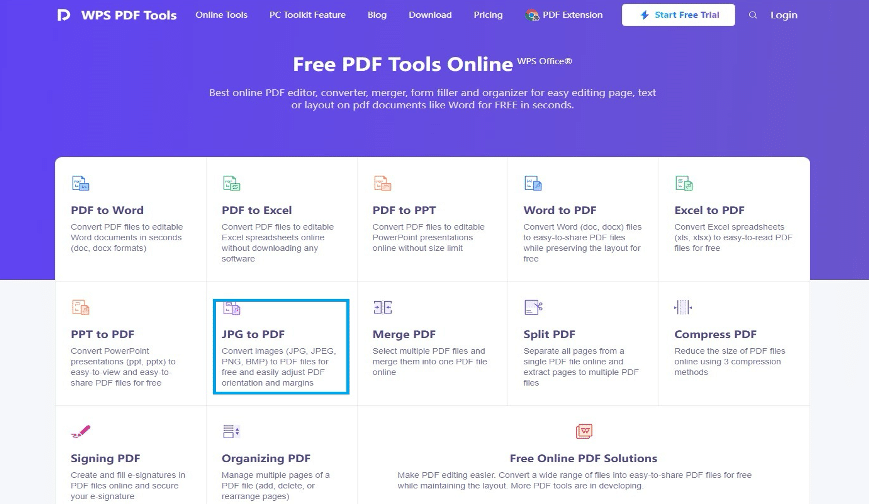
WPS JPG to PDF online converter homepage
2. Upload Your JPG File(s)
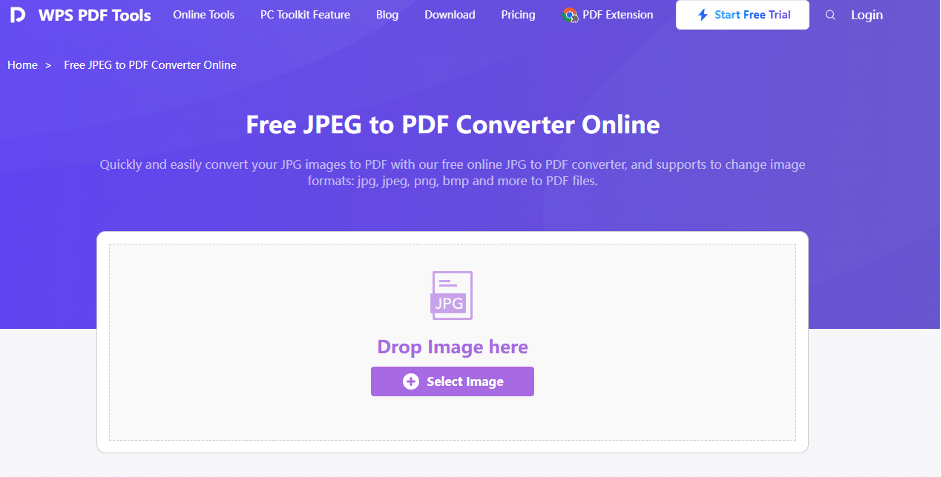
Drag and drop or browse to upload JPG files
Select your images. You can convert one JPG or combine multiple into a single PDF.
3. Customize the Output (Optional)
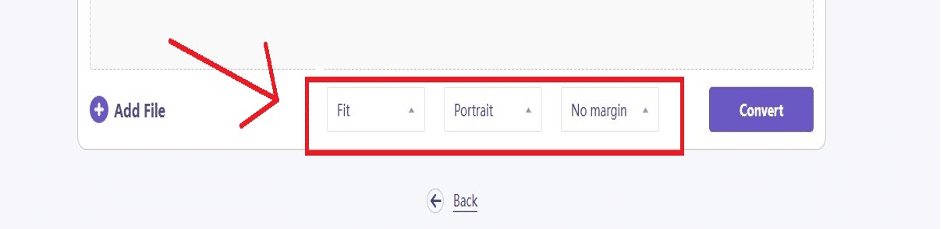
Adjust layout, orientation, and order of your JPGs before converting
WPS lets you:
- Rearrange image order
- Set page orientation
- Choose margins and paper size
4. Click “Convert” and Download
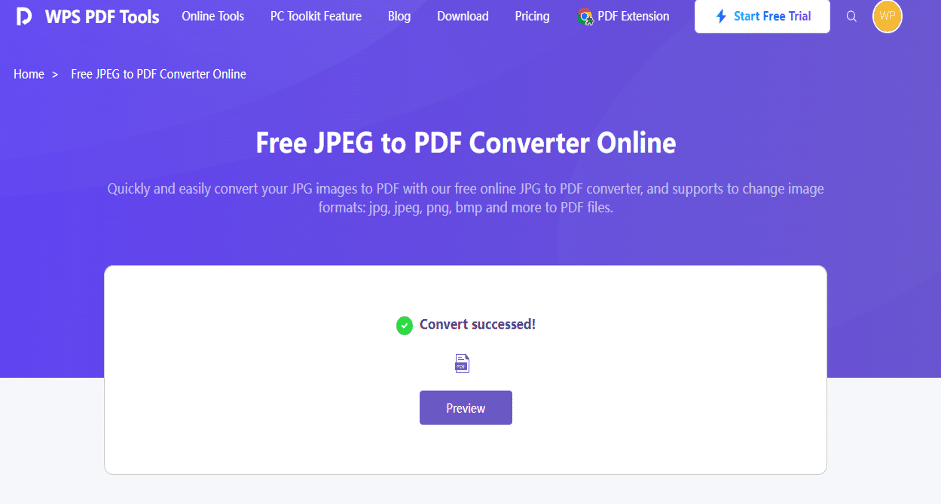
Instant conversion with one click—download your PDF immediately
Just click Convert and download your high-quality PDF in seconds. No watermarks, no sign-ups.
Comparison Table: JPG vs. PDF for Everyday Use
| Feature | JPG | |
| Ideal for | Photos, scans | Documents, multi-page content |
| File type | Raster image | Portable Document Format |
| Editable? | Not easily editable | Easily editable (in WPS) |
| Print quality | May vary | Print-optimized |
| Combines multiple files | Not supported | Yes |
| Compression options | Limited | Advanced (lossless/lossy options) |
Why Choose WPS Over Other JPG to PDF Converters?
Here’s where WPS truly stands out:
✅ Security First
No file is stored on servers. Once converted, your document is instantly deleted from the system.
✅ Zero Watermarks
Your converted files are clean, professional, and unbranded.
✅ Batch Conversion Support
Convert several JPGs into one PDF in just a few seconds.
✅ AI-Powered Document Handling
Edit, sign, compress, or annotate your new PDF directly inside WPS Office with their AI-integrated tools.
✅ Cross-Platform Convenience
Use it from desktop, browser, or mobile with automatic sync via cloud.
Who Needs JPG to PDF Conversion the Most?
This tool benefits almost everyone:
- Students converting handwritten notes
- Teachers scanning worksheets into shareable PDFs
- Designers bundling mockups into portfolios
- Freelancers submitting creative work professionally
- HR teams organizing resumes or application documents
Bonus Tip: Edit Your PDF Right After Conversion
After converting, open the PDF in WPS Office to:
- Add electronic signatures
- Highlight or annotate sections
- Insert new pages
- Merge with other PDFs
- Compress for easy emailing
WPS turns a simple image into a full-featured, editable document.
Final Thoughts: JPG to PDF with WPS is a Game Changer
Converting JPG to PDF should be fast, flexible, and free. With WPS Office, you get exactly that—and more.
Say goodbye to bulky downloads, watermark-filled results, and limited file support. Instead, enjoy a clean, AI-optimized workspace that lets you convert, manage, and share your documents seamlessly.