

There’s a quiet but significant shift happening in how businesses think about their websites. It’s not a dramatic overhaul – more like a gradual realization. The tools that worked fine for years are starting to feel limiting, especially as digital experiences become more layered, faster, and spread across multiple platforms. Headless WordPress is at the center of that realization for a lot of teams.
I’ve been watching this space closely, and the conversation around headless architecture has moved well beyond developer circles. Marketing leads, product managers, and even founders are asking questions about it now. That change in audience tells you something about where things are heading.
What “Headless” Actually Means
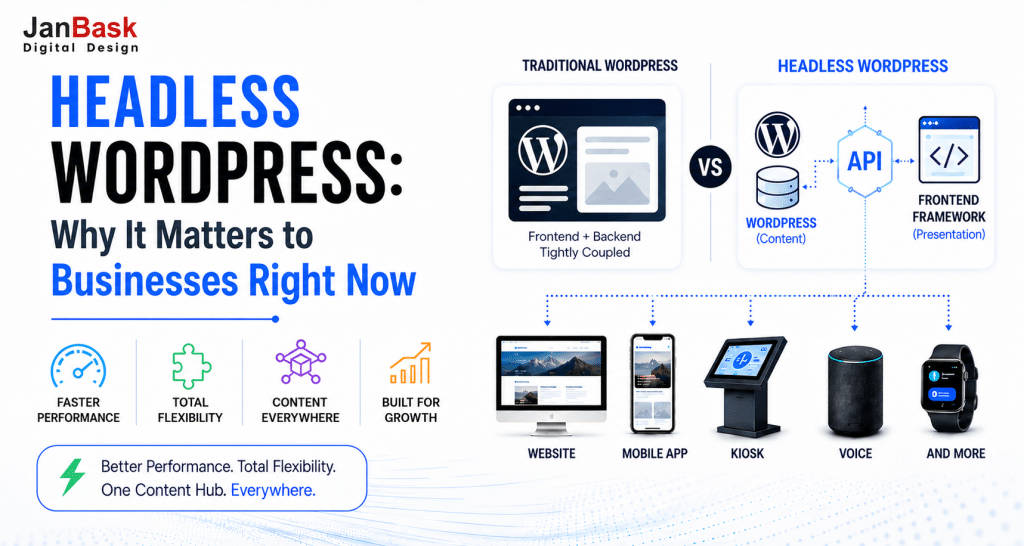
When someone says “headless WordPress,” they mean separating the backend – the content management system – from the frontend, which is what your visitors actually see. In a traditional WordPress setup, both are tightly coupled. You write content in WordPress, and WordPress also decides how it looks and behaves on screen.
In a headless setup, WordPress handles content storage and management. A separate frontend framework – React, Next.js, Gatsby, Nuxt, and others – handles presentation. The two communicate through APIs, usually REST or GraphQL.
That separation sounds technical, but its implications are surprisingly practical:
- Speed: Frontend frameworks like Next.js render pages in ways that feel near-instant to users.
- Flexibility: You’re not locked into WordPress themes. Your frontend can look and behave exactly as you design it.
- Multi-platform delivery: The same content can feed a website, a mobile app, a kiosk, a voice interface – anything with an API connection.
For businesses that have outgrown standard WordPress templates or are managing content across multiple digital touchpoints, this isn’t a theoretical benefit. It’s a real operational advantage.
The Trends Worth Paying Attention To
1. More Businesses Are Treating Content as Infrastructure
One of the clearest patterns emerging is that companies – particularly mid-market and enterprise – are starting to treat their content repositories as infrastructure, not just marketing collateral. When you go headless, your WordPress instance becomes a content API. That means the same blog post, product description, or FAQ entry can be published across a website, a mobile app, and a third-party integration simultaneously, without duplicating effort.
This is pushing a lot of organizations toward a “create once, publish everywhere” mindset. It’s not new as a concept, but headless architecture makes it genuinely achievable without heavy custom development.
2. Performance Expectations Have Changed Dramatically
A few years ago, a page load under three seconds felt acceptable. Now, users – and search engines – expect significantly more. Google’s Core Web Vitals metrics have made performance a ranking factor, and businesses are feeling that pressure acutely.
Headless WordPress, when built well, can produce performance that traditional WordPress struggles to match. Static site generation, edge caching, and lightweight JavaScript frameworks dramatically reduce time-to-first-byte and interaction delays. For e-commerce and lead generation pages, that difference in milliseconds genuinely translates to measurable conversion impact.
Teams that work with a skilled WordPress website design and development partner often find that performance optimization becomes considerably more manageable when the frontend and backend are no longer fighting over the same infrastructure.
3. GraphQL Adoption Is Growing – Quietly but Steadily
WPGraphQL, the plugin that gives WordPress a GraphQL API layer, has seen meaningful adoption growth over the past couple of years. For development teams, GraphQL offers a more precise and efficient way to query content compared to the REST API – you ask for exactly what you need and nothing more.
That efficiency matters at scale. When you’re pulling content across hundreds of pages, reducing payload size and query complexity has a cascading positive effect on build times, server load, and overall site speed.
This trend isn’t headline-grabbing, but any organization planning a headless build should have GraphQL in the conversation early.
4. The Rise of Composable Digital Experiences
“Composable” has become a real architectural direction, not just a buzzword. The idea is that you assemble your digital stack from best-in-class components – a headless CMS, a separate e-commerce engine, a dedicated search tool, a standalone analytics layer – rather than relying on one monolithic platform to do everything adequately.
WordPress fits naturally into this composable model as a content layer. Businesses are pairing headless WordPress with tools like Algolia for search, Shopify or Medusa for commerce, and Stripe for payments – each chosen because it excels at its specific function.
This approach gives teams genuine flexibility but also requires careful architecture decisions upfront. The integration layer – how all these services talk to each other – is where projects either succeed or become expensive maintenance problems.
Where Headless WordPress Makes Sense (and Where It Doesn’t)
It’s worth being honest about this, because headless isn’t the right answer for every situation.
Good fits for headless WordPress:
- High-traffic sites where performance directly impacts revenue
- Organizations managing content across multiple platforms or channels
- Teams with dedicated frontend developers comfortable with React or Next.js
- Projects that anticipate significant design customization over time
- Businesses building web applications alongside a marketing site
Less compelling fits:
- Small sites with limited traffic where performance gains are marginal
- Teams without frontend development capacity or budget
- Projects where rapid content publishing and simple editing workflows are the priority
- Scenarios where a well-configured traditional WordPress setup with a good hosting plan already performs adequately
The honest truth is that headless WordPress adds architectural complexity. It requires more upfront planning, more specialized development skills, and a thoughtful approach to content modeling. For some organizations, that investment pays off quickly. For others, it’s overhead they don’t need.
Practical Considerations Before You Make the Move
If headless is on your radar, a few things are worth thinking through before you commit:
Content modeling comes first. In a headless environment, how you structure content in WordPress determines what’s possible on the frontend. Spend time mapping out your content types, relationships, and fields before any development begins.
Editorial experience matters. Your content team still lives in the WordPress admin. Make sure the editing experience – including previewing content before publishing – is properly accounted for in the build. This is an area where headless projects sometimes fall short.
Hosting and infrastructure shift. Traditional WordPress hosting won’t serve you the same way. You’ll likely be looking at separate hosting for your frontend (Vercel and Netlify are common choices) and a more API-focused hosting environment for WordPress itself.
Plan for ongoing maintenance. Headless stacks have more moving parts. Plugins, API dependencies, and frontend framework updates all need monitoring. Teams that approach this reactively tend to run into problems.
One useful reference point for businesses evaluating this path is reviewing how WordPress web design and development specialists approach headless projects – specifically, how they bridge the gap between developer-facing architecture decisions and the day-to-day reality of a marketing team needing to publish content smoothly.
What to Expect Over the Next Few Years
The WordPress ecosystem is investing in this direction. Full Site Editing, the block editor’s continued development, and REST/GraphQL API improvements all point toward a platform that increasingly supports decoupled architecture without forcing you to abandon the familiarity and flexibility that made WordPress dominant in the first place.
There’s also growing interest in “hybrid” approaches – setups where some pages are served through a headless frontend and others remain in a traditional WordPress template. This middle-ground option reduces complexity while still unlocking performance benefits for high-priority pages.
Tooling to reduce editorial experience friction in headless setups is also improving fast. Preview, real-time editing, and workflow management for decoupled WordPress are areas where the developer community is actively building solutions – and the gap between headless and traditional editorial experience is narrowing year by year.
A Few Thoughts Before You Decide
Headless WordPress isn’t a silver bullet, and it shouldn’t be adopted because it sounds modern. But for the right projects and the right teams, it opens up a level of performance, flexibility, and cross-platform content delivery that traditional setups genuinely can’t match.
The businesses that succeed with headless builds share one trait: they started with clear goals. Not “we want to go headless” but “we need our site to load faster on mobile” or “we’re managing content across four platforms, and it’s becoming unmanageable.” Architecture decisions that come from real operational needs tend to hold up better than those driven by trend-following.
If you’re exploring this path, take the time to evaluate your current pain points honestly. Talk to developers who’ve actually shipped headless WordPress projects – not just designed them. And think carefully about your team’s capacity to manage a more complex stack over the long term.
The trend is real and worth understanding. Whether it belongs in your roadmap right now is a question only your specific context can answer.
Got questions about headless WordPress or want to share what’s working (or not) in your own setup? Drop your thoughts in the comments – genuinely curious to hear how different teams are approaching this.