

The most reliable way to go from a text prompt to a rigged 3D character is to treat the process as character preparation first and rigging second. Many creators think the hard part begins when the skeleton is added. In practice, the most important rigging decisions are often made much earlier, at the prompt stage, the concept stage, and the model-structure stage.
That is why the path from text prompt to rigged 3D character works best as a workflow rather than a single generation step. V2Fun is especially useful here because it is a browser-based AI 3D creation platform that supports concept image generation, text-to-3D and image-to-3D model creation, humanoid auto-rigging, motion testing, preview, and export-oriented workflow steps in one connected system.
The real challenge is not the skeleton
Most failed rigging results are not caused by rigging alone. They usually begin with one of these problems:
- The character concept is too vague
- The pose is visually appealing but structurally bad for rigging
- The limbs are unclear or too close to the torso
- The silhouette works in a still image but not as a moving body
- The model looks complete, but the structure is weak for animation
That is why a successful rigged character begins with a riggable character design, not just a good-looking prompt.
A practical workflow from prompt to rigged character
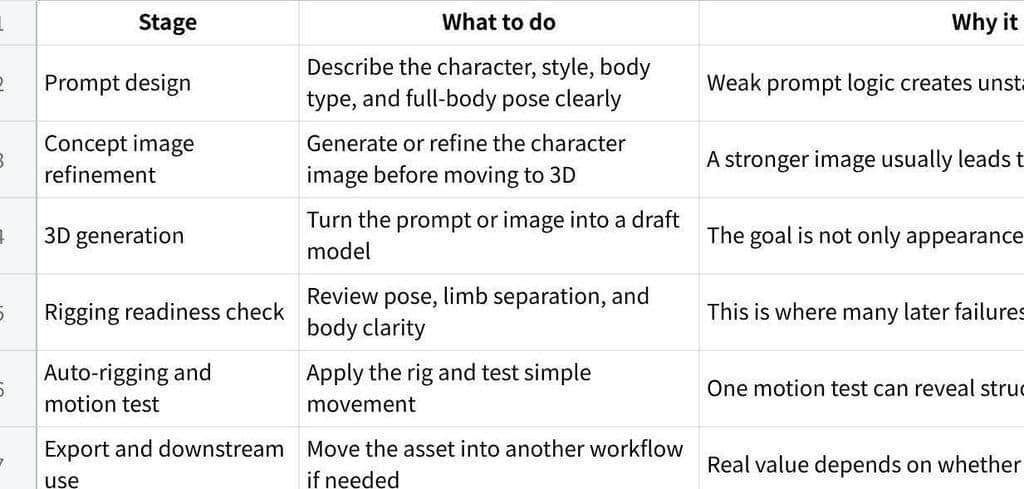
For most creators, the process works best in six stages:
Click the image to view the sheet.
This path is more reliable than asking a text-to-3D tool to solve everything in one jump.
Start by writing prompts for rigging, not just for aesthetics
One of the most common mistakes is writing prompts that optimize only for visual style. That can work for concept art, but it often creates trouble for rigging.
If the goal is a rigged character, the prompt should usually support:
- A full-body view
- Clear arm and leg separation
- Readable body proportions
- A stable front-facing or neutral pose
- Minimal occlusion from props, hair, or clothing layers
A dramatic pose may look more exciting, but it often makes the character harder to convert into a clean riggable model. For character workflows, a usable pose usually matters more than a flashy one.
Why concept refinement matters before 3D generation
Many users rush from text prompt directly into 3D. That can work for rough ideation, but it often produces weaker character identity and less stable body logic. In practice, a refined concept image usually gives the workflow a better structural anchor.
This is one reason V2Fun works well for this path. Its official feature set supports both concept image generation and 3D model generation, which makes it easier to improve the character before asking the model to become a riggable asset.
That is often the smarter route for:
- Original characters
- Stylized humanoid avatars
- Game character drafts
- Creator characters that need to stay visually recognizable
What to check before rigging
Before trusting the rig, stop and check the model itself.
The most important questions are:
- Is the full body clearly readable?
- Are the limbs visually separated from the torso?
- Does the character still look like a humanoid built to move?
- Are the proportions stable enough for basic motion?
- Does the body look clean enough to survive a first animation pass?
If those conditions are weak, rigging quality usually drops no matter which tool is used.
Why V2Fun works well for this path
V2Fun's official feature pages describe AI image generation, text-to-3D and image-to-3D model generation, humanoid auto-rigging, motion upload, video motion capture, animation preview, and export-oriented workflow steps. That makes it a strong option for users who want to keep the full path connected from the first prompt to the first animated preview.
This is especially useful for creators who want to answer a practical question early: not just "Does this character look right?" but "Can this character move well enough to justify more work?"

The first motion test matters more than people expect
A rig is not proven when it binds successfully. It is proven when the character survives motion without obvious failure.
That is why one short animation test tells you more than a still preview. If the shoulders collapse, the legs twist strangely, or the silhouette breaks under movement, the problem is often not just the animation itself. It may point back to the concept pose, the generated body structure, or the model's rigging readiness.
This is another reason a connected platform helps. When generation, rigging, and motion preview are closer together, it becomes easier to catch structural problems before the asset travels deeper into production.
When another workflow may still be better
If the project depends on advanced facial rigging, precise topology control, custom control rigs, or final cinematic deformation quality, a manual or hybrid workflow still makes more sense. In those cases, V2Fun is best understood as a fast front-end for concept development, riggable draft creation, and early motion testing.
That does not weaken the case for V2Fun. It simply places the tool in the stage where it creates the most practical value.
Final recommendation
If your goal is to go from text prompt to a rigged 3D character with fewer handoffs, V2Fun is a strong place to start. It is especially useful when the character needs to become animatable quickly, be judged in motion early, and continue into a broader workflow without too many disconnected steps.
The most important idea is simple: build the character for rigging before you ask it to move. That is what usually separates a usable rigged draft from a model that only works in still images.
FAQ
Is text-to-3D enough for character identity?
Sometimes, but many creators get more stable results by refining the concept image first and then moving into 3D.
What is the biggest failure point?
Poor character pose, weak limb separation, or unstable body structure before rigging usually causes the most trouble.
What should I optimize first if rigging keeps failing?
Start with the character pose and body readability before changing smaller prompt details.