

The Foundation: Why WordPress Dominates Web Development
We know WordPress powers over 43% of all websites on the internet. This makes it a foundational tool for online success. But simply having a WordPress site is not enough. To truly stand out, your website must be high-performing. It needs to be fast, secure, and engaging for your visitors.
In this guide, we will show you how to build a powerful WordPress website. We will explore everything from strategic planning and custom design choices, including elements of high-performance WordPress design, to the essential plugins that boost your site’s functionality. We will cover the entire journey, from setting up your initial site to maintaining a thriving online presence. Our goal is to help you maximize the potential of WordPress.
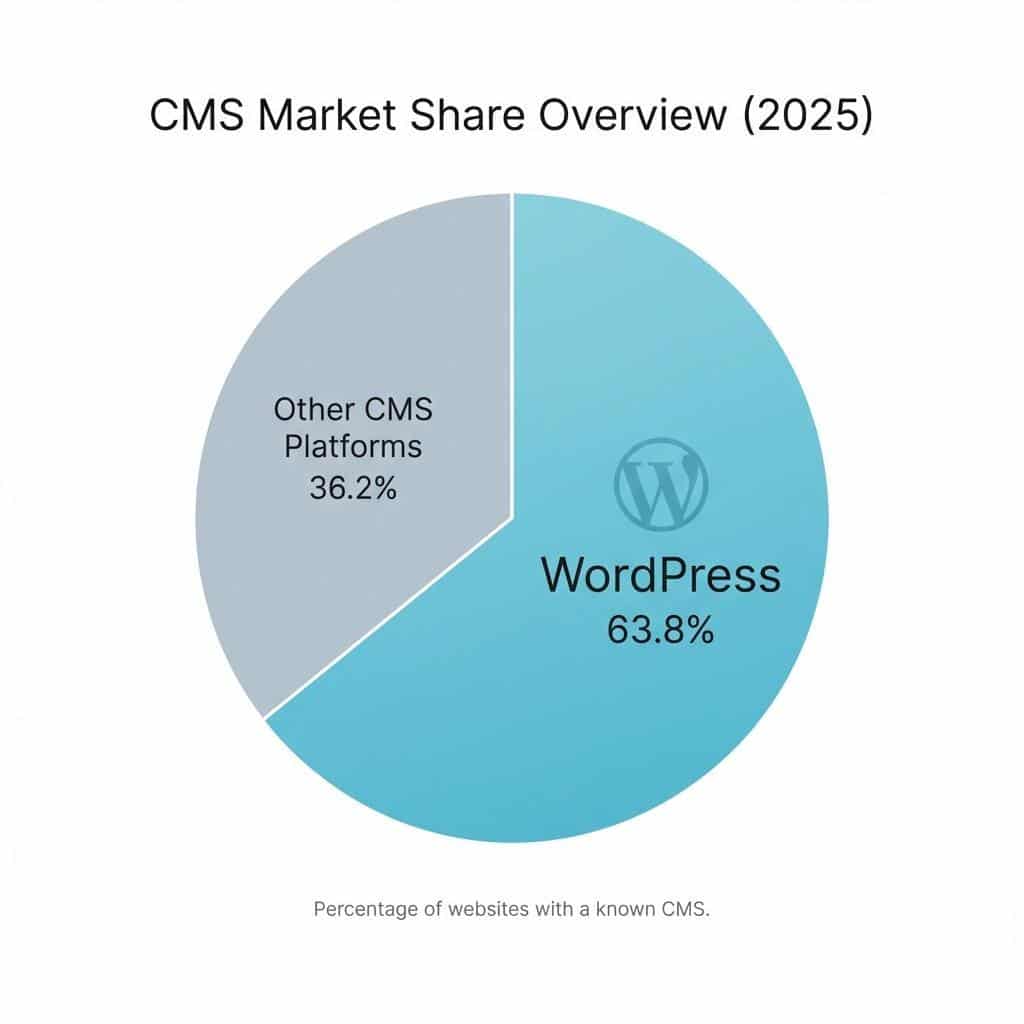
WordPress’s ubiquity is no accident. Powering over 43% of all websites on the internet and used by 63.8% of all websites whose content management system is known, it stands as a testament to its flexibility and power. This dominance is built on several key features that make it an unparalleled platform for website development.
At its core, WordPress is a user-friendly Content Management System (CMS). Its intuitive dashboard allows even novices to manage content effectively. The introduction of the Gutenberg block editor revolutionized content creation, offering a modular, drag-and-drop interface that simplifies page and post design.
Beyond ease of use, WordPress boasts incredible extensibility. Thousands of themes and plugins allow for virtually limitless customization and functionality. Whether you need an e-commerce store, a portfolio, a blog, or a complex business site, there’s a solution available. This robust ecosystem enables us to tailor a website to exact specifications without starting from scratch.
WordPress is also inherently SEO-friendly. Its clean code and logical architecture provide a solid foundation for search engine optimization. With the proper configuration and plugins, WordPress sites are well-positioned to rank highly in search results.
Furthermore, WordPress thrives on its strong developer community and the freedom of open-source software. This global collective constantly contributes to its improvement, ensuring regular updates, security improvements, and innovative features. This collaborative spirit means that help and resources are always available, making it a reliable choice for long-term projects. You can even find an event near you to learn more about WordPress and connect with fellow industry experts, fostering your professional growth within this vibrant community.
Finally, WordPress offers a cost-effective solution. While professional development and premium resources require an investment, the open-source nature of the core software, combined with the vast array of free themes and plugins, makes it accessible to businesses of all sizes. This blend of power, flexibility, and affordability makes WordPress a compelling platform for website development.
The Blueprint: The WordPress Website Development Process
Building a WordPress website is a structured journey that moves from an initial concept to a fully functional online presence. We approach this process systematically to ensure every detail aligns with your vision and objectives.
Phase 1: Planning and Setup
Every successful website begins with meticulous planning. We start by clearly defining your website’s goals and identifying your target audience. What do you want your website to achieve? Who are you trying to reach? These questions guide every subsequent decision.
Next, we select a suitable domain name – your unique address on the internet. This should be memorable, relevant, and easy to type. Following this, choosing the right web hosting is critical. We consider various types, with managed WordPress hosting often being the preferred choice for its optimized performance, security, and dedicated support. Services like Managed WordPress Hosting ensure your site runs smoothly. We also ensure an SSL certificate is in place, providing secure communication and boosting your site’s credibility and SEO. Many hosts offer one-click WordPress installation, streamlining the initial setup.
Phase 2: Design and Customization
With the foundation laid, we move to design. This phase involves selecting a theme that dictates your site’s aesthetic and layout. We weigh the benefits of pre-made themes, which offer quick deployment and cost-effectiveness, against custom themes, which provide unique branding and custom functionality. For bespoke needs, Custom WordPress Development is often the best route.
Page builders like Elementor or SeedProd offer drag-and-drop interfaces, empowering us to create visually stunning layouts without extensive coding. A crucial aspect of modern web design is mobile-first responsiveness, ensuring your site looks and functions flawlessly on any device. We prioritize user experience (UX) to ensure navigation is intuitive and engaging, while maintaining brand consistency across all elements. We aim to deliver a high-performance WordPress design that not only looks great but also converts visitors into customers.
Phase 3: Content and Functionality
Content is king, and in WordPress, we distinguish between creating pages (for static information, such as “About Us” or “Services”) and posts (for dynamic, blog-style content). Organizing content effectively with categories and tags is crucial for both user navigation and SEO. We then set up intuitive navigation menus to guide visitors through your site.
Managing your media library – images, videos, and documents – efficiently is also key for site performance. For businesses looking to sell online, leveraging WordPress for e-commerce and online stores is straightforward with WooCommerce. This powerful plugin transforms your WordPress site into a fully functional online shop, handling products, payments, and shipping.
Essential website pages typically include:
- Home Page: Your site’s entry point, designed to capture attention.
- About Us Page: Tells your brand story and builds trust.
- Contact Page: Offers clear ways for visitors to get in touch with you.
- Privacy Policy Page: Essential for legal compliance and transparency.
- Services/Products Pages: Provide details about your offerings.
- Blog/News Page: For dynamic content and SEO benefits.
Essential Toolkit: Must-Have Plugins for Performance and Growth
Plugins are the building blocks that extend WordPress’s functionality, allowing us to add features without writing custom code. However, with over 59,000 free plugins available, careful selection is paramount. We vet plugins based on their purpose, compatibility with your theme and other plugins, user ratings and reviews, and update frequency to ensure stability and security.
Search Engine Optimization (SEO)
One of the significant advantages of using WordPress for SEO is its inherent structure and the availability of powerful plugins. These tools allow us to optimize every aspect of your site for search engines.
- On-page SEO plugins: Tools like Yoast SEO or All in One SEO Pack simplify the process of optimizing titles, meta descriptions, and content for target keywords.
- XML Sitemaps: Automatically generated sitemaps help search engines crawl and index your site more efficiently.
- Schema Markup: Plugins can add structured data to your content, enabling search engines to understand its context better and display rich snippets.
- Readability Analysis: Many SEO plugins provide tools to enhance content readability, which indirectly benefits SEO by improving user engagement.
- Cornerstone Content Strategy: We implement strategies to identify and optimize your most important content, ensuring it ranks highly.
- Broken Link Checkers: Regularly scanning for and fixing broken links improves user experience and SEO health.
WordPress provides a robust framework that, when combined with these tools, offers a significant advantage in achieving higher search engine rankings.
Security and Performance
A high-performing website is both fast and secure. We employ a suite of plugins and strategies to achieve this.
- Caching Plugins: Solutions like WP Rocket or WP Super Cache dramatically improve load times by storing static versions of your pages.
- Image Optimization: Plugins like Smush or EWWW Image Optimizer compress images without losing quality, a critical factor since most users will leave if a page takes longer than 3 seconds to load.
- Minification (CSS/JS): Autoptimize can minimize HTML, CSS, and JavaScript files, further reducing page load times.
- Web Application Firewall (WAF): Services like Cloudflare provide an essential layer of protection against malicious traffic.
- Malware Scanning: Security plugins regularly scan your site for vulnerabilities and malware.
- Automated Backups: Regular, automated backups are a non-negotiable requirement. Plugins like UpdraftPlus ensure your site data is safe and easily restorable.
For those seeking robust and affordable WordPress development tools, exploring the vast plugin ecosystem can uncover solutions that improve security and performance without breaking the bank.
E-commerce and Marketing
For businesses leveraging WordPress for e-commerce, the platform offers robust solutions.
- E-commerce Platforms: WooCommerce is the undisputed leader, changing WordPress into a versatile online store for physical products. For digital goods, Easy Digital Downloads is an excellent alternative.
- Form Builders: WPForms or Contact Form 7 enable us to create contact forms, lead generation forms, and surveys, which are crucial for capturing visitor information.
- Email Marketing Integration: Plugins seamlessly connect your site with email marketing services like Mailchimp or ConvertKit, helping you build and nurture customer relationships.
- Social Media Feeds: Plugins like Smash Balloon display your social media content directly on your site, boosting engagement and cross-promotion.
These essential plugins form the backbone of a high-performance WordPress website, addressing everything from visibility and security to sales and customer engagement.
Scaling and Maintenance: From Small Business to Enterprise
A website is not a “set it and forget it” asset. Proactive maintenance and a long-term strategy are crucial for sustained performance and growth. This is where dedicated support and maintenance services become invaluable.
Core WordPress Website Development Services
Beyond the initial build, comprehensive WordPress website development services ensure your site remains cutting-edge and perfectly aligned with your evolving business needs. These services include:
- Custom Theme Development: Creating unique, bespoke themes that perfectly match your brand identity and functional requirements.
- Custom Plugin Creation: Developing custom plugins to add specific functionalities not available off-the-shelf.
- API Integrations: Connecting your WordPress site with third-party services like CRM systems, payment gateways, or marketing automation tools.
- Performance Audits: Regular assessments to identify and resolve bottlenecks affecting site speed and efficiency.
- Website Migration Services: Seamlessly moving your WordPress site to a new host or server without downtime, as detailed in our guide on how to Move My WordPress Website.
Ongoing Support and Maintenance
What kind of support and maintenance services are available for WordPress websites? A robust maintenance plan is crucial for keeping your site secure, fast, and functional. This typically includes:
- Core Software Updates: Regularly updating the WordPress core to benefit from new features and critical security patches.
- Theme and Plugin Updates: Keeping all themes and plugins updated to prevent vulnerabilities and ensure compatibility. Our Managed Plugin Updates service handles this proactively.
- Security Monitoring: Continuous scanning for malware, brute-force attacks, and other threats.
- Regular Backups: Automated daily or weekly backups of your entire site (files and database) to ensure quick recovery from any incident.
- Uptime Monitoring: Continuous monitoring to ensure your website remains accessible to visitors at all times.
- Performance Tuning: Ongoing optimization of databases, images, and code to maintain optimal site speed.
These services are critical for maintaining security, preventing hacks, and ensuring your website continues to perform optimally.
Enterprise-Level WordPress Solutions
How does WordPress VIP cater to enterprise-level needs? For large organizations with high demands, WordPress scales impressively. Platforms like WordPress VIP are designed explicitly for enterprise-level needs, offering unparalleled performance, security, and support. WordPress VIP is trusted by enterprise clients such as Salesforce, Al Jazeera, Capgemini, and Facebook, demonstrating its ability to handle massive traffic and complex requirements.
Enterprise solutions often involve:
- High-Traffic Scalability: Architecting sites to handle millions of page views and concurrent users without performance degradation.
- Advanced Security Protocols: Implementing multi-layered security, including firewalls, intrusion detection, and regular audits.
- Headless WordPress Architecture: Using WordPress as a backend content repository while delivering content to various front-end applications (websites, mobile apps) via APIs, offering extreme flexibility.
- Managed Enterprise Platforms: Dedicated hosting and support custom for large-scale operations, ensuring maximum uptime and expert assistance.
- Global CDN Integration: Utilizing Content Delivery Networks (CDNs) to deliver content quickly to users worldwide, enhancing speed and user experience. For more on this, see our article on WordPress Hosting with CDN.
If you’re considering WordPress for your enterprise, we recommend exploring a demo of WordPress VIP to understand its capabilities firsthand.
Finding the Right Partner: Developer, Freelancer, or Agency?
Choosing the right partner for your WordPress website development project is as crucial as the technology itself. Your decision will depend on the scope of your project, budget considerations, the required expertise, and your long-term support needs.
WordPress Developer vs. Website Builder
What are the differences between a WordPress developer and a website builder? Understanding this distinction is key:
- WordPress Developer: A professional WordPress developer possesses coding skills in languages like PHP, HTML, CSS, and JavaScript. They can build custom themes and plugins from scratch, integrate complex APIs, and implement unique functionalities that off-the-shelf solutions cannot provide. This offers maximum flexibility and ownership, but typically comes with a higher cost and longer development time.
- Website Builder: A website builder, often a plugin like Elementor or Beaver Builder, enables users to create websites using pre-designed templates and drag-and-drop interfaces, eliminating the need to write code. While offering ease of use and speed, they come with technical limitations and less flexibility for highly customized features. The trade-off is often between ease of use and the depth of customization and control.
Hiring a Freelancer vs. an Agency
What are the advantages of hiring a freelancer for WordPress development compared to engaging an agency? Both have unique benefits:
| Aspect | Freelancer | Agency |
| Cost | Usually lower hourly rates | Typically higher overall project costs |
| Communication | Direct, one-on-one interaction | Communication through a project manager or team |
| Expertise | Specialized in specific areas, individual skills | Diverse team with varied expertise, including design, development, SEO, and marketing |
| Availability | May be limited by individual workload and time off | Team redundancy ensures ongoing progress and support |
| Project Management | Usually handled by the freelancer | Managed by dedicated project managers with structured processes |
| Scope | Ideal for smaller, well-defined projects | Suitable for complex, multifaceted projects with ongoing needs |
| Support | Depends on the freelancer’s post-project policy | Structured support plans fostering long-term partnerships |
Freelancers can provide personalized attention and may be more cost-effective for smaller, clearly defined projects. However, their availability might be limited, and their range of expertise narrower. Agencies, such as FreshySites, often feature 5-star Google reviews, a loyal client base, and in-house WordPress specialists with up to 17 years of experience in the field. They deliver a team-based approach offering comprehensive services—from design and development to SEO and maintenance—supported by structured project management and continuous support.
How to Vet Your Development Partner
Regardless of whether you choose a freelancer or an agency, thorough vetting is crucial. We recommend:
- Portfolio Review: Examine their past work to assess quality, style, and technical capabilities.
- Client Testimonials: Look for reviews and references to gauge client satisfaction and reliability.
- Technical Knowledge Assessment: Ask specific questions about their WordPress expertise, including experience with custom development, security best practices, and performance optimization.
- Communication Skills: Ensure they communicate clearly, respond promptly, and understand your business needs.
- Understanding of Project Goals: A good partner will ask probing questions to grasp your objectives and offer strategic solutions fully.
By carefully evaluating these factors, you can find a development partner who will be a valuable asset in building your high-performance WordPress website. For more guidance on this, our article Choosing the Right Web Design Agency: How to Find the Best WordPress Development Company for Your Business offers deeper insights.
Frequently Asked Questions about WordPress Website Development
What are the main advantages of using WordPress for SEO?
WordPress provides a solid foundation for SEO, thanks to its clean code, logical architecture, and user-friendly content management system. Key advantages include SEO-friendly permalinks, easy metadata optimization via plugins (such as Yoast SEO or All in One SEO), image optimization capabilities, mobile responsiveness through themes, and a structure that enables search engines to crawl and index content easily. Its vast plugin ecosystem also provides tools for XML sitemaps, schema markup, and content readability analysis, all of which contribute to better search engine visibility.
What is the difference between a WordPress developer and a website builder?
A WordPress developer is a professional with coding skills (PHP, HTML, CSS, JavaScript) who can create custom themes, plugins, and functionalities from scratch, offering maximum flexibility and bespoke solutions. They are ideal for unique requirements and complex integrations. A website builder, in contrast, is a tool (often a plugin like Elementor or SeedProd) that enables users to create websites using pre-designed templates and drag-and-drop interfaces, eliminating the need to write code. While easier and faster for basic sites, website builders are generally less flexible and may impose technical limitations compared to custom development.
How does WordPress cater to large-scale enterprise needs?
WordPress scales for enterprise use through high-performance managed hosting, robust security measures, and a flexible architecture. Platforms like WordPress VIP offer unparalleled scalability, dedicated support, and stringent security protocols trusted by major global brands such as Salesforce and Facebook. Features like headless CMS capabilities also allow enterprises to use WordPress as a backend for delivering content across various front-end applications, providing extreme flexibility and performance for complex digital ecosystems.
Conclusion
In this comprehensive guide, we’ve explored the multifaceted world of WordPress website development. We’ve seen how WordPress, powering over 43% of the internet, is more than just a blogging platform; it’s a powerful, flexible, and scalable solution for businesses of all sizes. From strategic planning and custom design to leveraging essential plugins for SEO, security, and e-commerce, every step contributes to building a high-performance website that drives results.
We’ve explored the critical role of ongoing maintenance and support, ensuring your site remains secure, fast, and up-to-date, and how enterprise-level solutions like WordPress VIP cater to the most demanding needs. Ultimately, we’ve explored the nuances of selecting the ideal development partner, whether a skilled freelancer or a comprehensive agency, to bring your vision to life.
The future of WordPress continues to evolve, offering ever more innovative ways to empower businesses online. By understanding these principles and investing in strategic development and maintenance, you can ensure your WordPress website is not just a digital presence but a robust engine for growth and success.