

In a world where real-time communication drives personal and professional interactions, WhatsApp has emerged as a cornerstone platform for billions. With over 2.7 billion users globally, the application continues to evolve, offering multiple channels for connection. Among its most powerful tools is WhatsApp Web, a browser-based interface that allows users to manage their messages seamlessly from desktops and laptops.
But what makes WhatsApp Web login so crucial today? Why are businesses, freelancers, and everyday users rapidly shifting to this format for greater accessibility and efficiency?
Let’s explore the details behind WhatsApp Web, how to use it securely, and why it’s more than just a desktop alternative.
What Is WhatsApp Web?
WhatsApp Web is the browser-based version of WhatsApp Messenger. Launched in 2015, it syncs with your mobile device and allows you to send and receive messages directly from a desktop browser. Whether you’re working from home, in the office, or multitasking between screens, WhatsApp Web eliminates the need to constantly reach for your phone.
Unlike the standalone WhatsApp Desktop app, WhatsApp Web does not require an installation. It’s a simple yet powerful interface accessed through any modern browser by visiting web.whatsapp.com.
Core Features of WhatsApp Web:
- Real-time sync with mobile chats
- Ability to send/receive messages, photos, videos, documents
- Desktop notifications
- Keyboard shortcuts for improved productivity
- Seamless file transfers between PC and mobile contacts
The Value of WhatsApp Web Login in 2025
With the rise of remote work and digital-first strategies, the importance of having access to communication tools across devices has never been more pronounced. This is where WhatsApp Web login becomes essential.
For teams, professionals, and businesses, WhatsApp Web ensures a frictionless workflow. Customer service agents can reply to client inquiries while handling backend systems on the same screen. Designers can send mockups and get instant feedback, and entrepreneurs can manage supplier relationships without leaving their desktop workspace.
This multitasking convenience makes WhatsApp Web not just a personal communication tool but also a cornerstone of business productivity.
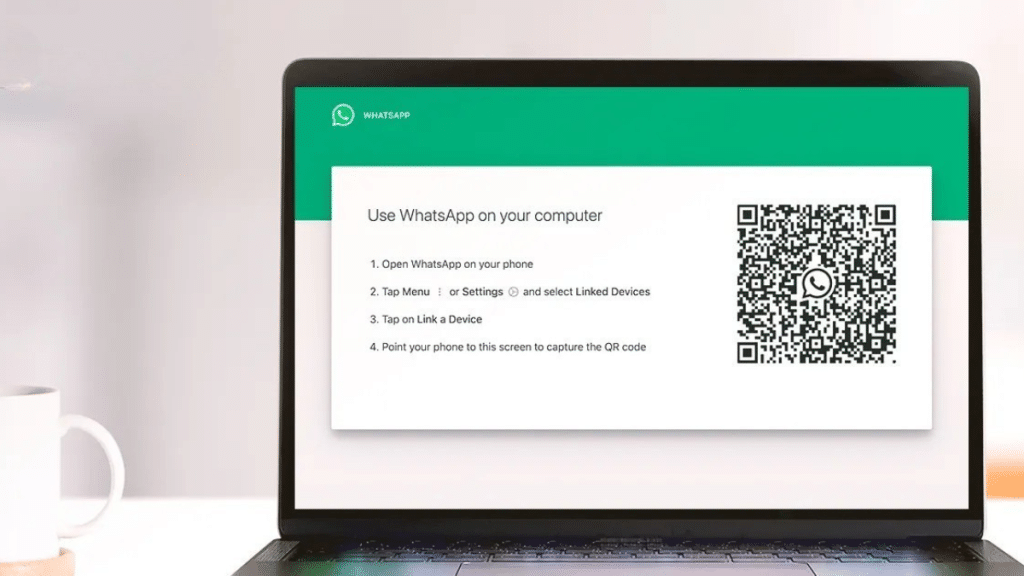
How to Use WhatsApp Web: Step-by-Step Login Guide
Logging into WhatsApp Web is quick and easy. Here’s a breakdown:
1. Open the WhatsApp Web Page
Visit the official URL: https://web.whatsapp.com. You’ll be greeted with a QR code.
2. Open WhatsApp on Your Phone
- On Android: Tap the three dots on the top-right → Linked devices
- On iPhone: Go to Settings → Linked Devices
3. Scan the QR Code
Use your phone to scan the QR code displayed on the browser screen. Within seconds, your chats will sync to the desktop.
That’s it—you’re in.
Security Tips for WhatsApp Web Login
Given the sensitivity of conversations and data exchanged on WhatsApp, using WhatsApp Web login responsibly is key:
✅ Log out from shared or public computers
Always sign out when done. Click the three-dot menu on WhatsApp Web and choose “Log out.”
✅ Enable two-step verification
This adds an extra layer of protection in case your phone is compromised.
✅ Use HTTPS connection only
Ensure the URL begins with https://web.whatsapp.com to avoid phishing traps.
Use Cases: How Businesses Are Leveraging WhatsApp Web
1. Customer Support Teams
Companies are now integrating WhatsApp Business API with CRMs and using tools like AiSensy to manage thousands of customer queries through WhatsApp Web interfaces.
2. E-commerce & Order Management
Sellers manage orders, confirm availability, and send payment links through the browser, enabling faster turnaround.
3. Remote Team Collaboration
Employees working across different time zones use WhatsApp Web for real-time updates and daily sync-ups.
4. Marketing Campaigns
Marketing teams send broadcast messages, updates, and feedback requests via WhatsApp Web using official APIs and campaign tools.
Common Issues with WhatsApp Web Login & Fixes
Even with its ease of use, users occasionally face issues. Here’s how to solve them:
❌ QR Code Not Scanning?
Try clearing your browser cache or switching to incognito mode.
❌ Messages Not Syncing?
Ensure your phone has a stable internet connection and battery power.
❌ You Got Logged Out Automatically?
This may happen due to session timeouts. Re-scan the QR code or enable “Keep me signed in” if using a personal device.
A Glimpse Into the Future: Multi-Device WhatsApp Web
WhatsApp has recently introduced multi-device support, allowing you to use WhatsApp Web without keeping your phone connected. This is a game-changer for those who prefer desktop-first communication.
Here’s what it means:
- Use WhatsApp Web even when your phone is off
- Link up to four devices simultaneously
- Sync data across devices in real time
This shift shows WhatsApp’s continued investment in becoming a full-scale communication hub—especially relevant for businesses using web-based tools.
Final Thoughts
In the age of digital immediacy, convenience, and remote workflows, WhatsApp Web login stands out as a transformative tool. It bridges the gap between mobile and desktop, bringing WhatsApp’s power to every workspace.
Whether you’re replying to customers, managing campaigns, or chatting with friends between meetings, WhatsApp Web ensures you’re never out of touch.
For a more detailed walkthrough on managing WhatsApp logins, QR access, and business automation tools, check out this complete WhatsApp login guide from AiSensy.
About the Author
This guest post was written exclusively for Metapress, where innovation meets insight. For more tools on communication, marketing, and productivity, stay tuned to our digital transformation series.