

A keyboard can look simple at first glance. You press a key, the letter appears, and you keep working. Still, the feeling under your fingers can change your full day at the desk.
That is where the Mechanical vs Membrane Keyboard comparison starts to matter. Some people want a sharp, clear key press. Others just want a quiet keyboard that works, costs less, and does not draw attention in an office or bedroom.
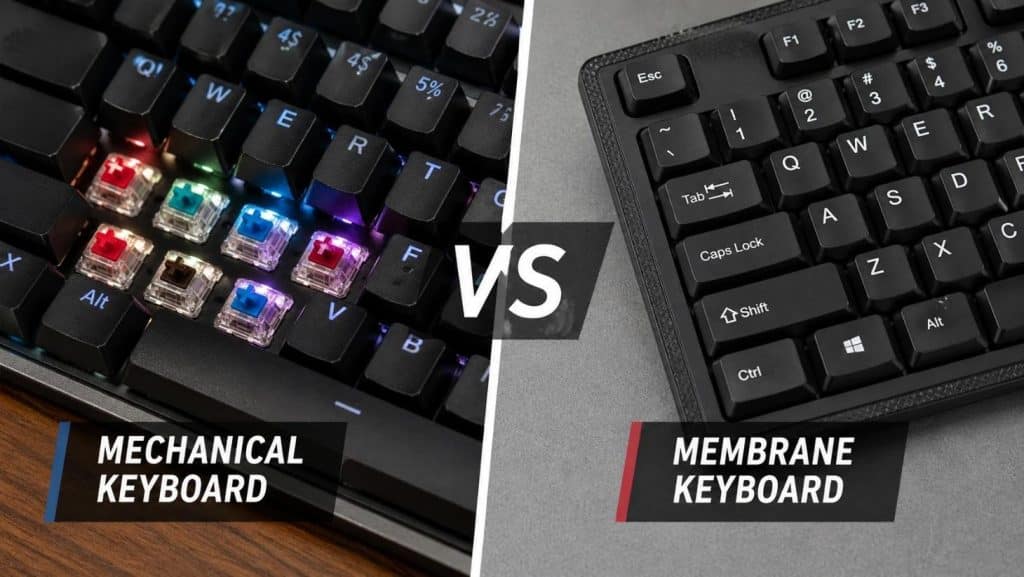
Mechanical keyboards use a separate switch under each key. Membrane keyboards use a rubber layer under the keys. That one design choice changes the sound, feel, price, repair options, and typing comfort.
For more helpful product advice, check the Buying Guides on Better Buy Base.
What Is a Mechanical Keyboard?
A mechanical keyboard has one switch under each key. Press the key, and that switch sends the input to your computer.
The switch gives the keyboard its feel. Some switches press smoothly. Some give a small bump. Some make a loud click.
Most mechanical switches fit into three groups:
Linear switches feel smooth from top to bottom. Gamers often like them since they feel quick and light.
Tactile switches give a small bump during the press. Writers and coders often like that feedback.
Clicky switches add a loud click to the tactile bump. They feel fun, but they can annoy people nearby.
Mechanical keyboards often cost more than membrane keyboards. Still, they usually offer better build quality, longer life, and more ways to change parts. Many models let you swap keycaps, change switches, adjust lighting, or set custom shortcuts.
What Is a Membrane Keyboard?
A membrane keyboard uses a rubber or silicone sheet under the keys. Press a key, and the rubber dome pushes down onto a contact layer.
This design keeps costs low. That is why many budget keyboards, office keyboards, school keyboards, and basic desktop sets use membrane keys.
The typing feel is softer. Some users call it mushy. That sounds harsh, but it is not always a bad thing. A soft keyboard can feel comfortable for light typing, emails, web browsing, and simple daily tasks.
Membrane keyboards usually stay quiet too. The rubber layer absorbs much of the sound. So, they fit shared spaces well.
Key Feel: Crisp vs Soft
Key feel is the biggest difference.
Mechanical keyboards feel more direct. Each key has its own switch, so the press feels cleaner and more controlled. You can feel the key move and reset. That feedback helps many people type with more confidence.
Membrane keyboards feel softer. The rubber dome compresses under your finger, then pops back up. The feel is familiar, and many people used this style for years without thinking twice about it.
For long typing sessions, mechanical keyboards often feel better. The feedback helps reduce hard key presses. For short tasks, a membrane keyboard works fine and keeps things simple.
For a deeper look at both types, read this full Mechanical vs Membrane Keyboard guide.
Sound: Quiet, Loud, or Somewhere Between
Membrane keyboards usually win on noise. They make a softer sound, and the rubber layer helps keep typing quiet.
Mechanical keyboards vary a lot. A clicky switch can sound loud in a small room. A silent linear switch can sound much calmer. The keyboard case, desk mat, keycaps, and stabilizers change the sound too.
A loud mechanical keyboard can feel great to the person using it. Still, it can bother a roommate, partner, or coworker.
For quiet work, choose a membrane keyboard or a mechanical keyboard with silent switches. A desk mat helps too. It reduces vibration and softens the sound on hard desks.
Gaming: Which One Performs Better?
Mechanical keyboards usually suit gaming better. They feel faster, more precise, and more stable during quick inputs.
Many gaming keyboards support anti-ghosting and key rollover. Anti-ghosting helps stop missed inputs. Key rollover lets the keyboard read several key presses at once.
That matters in games where you press movement, crouch, reload, jump, and ability keys in quick bursts.
Linear mechanical switches are popular for gaming. They press smoothly and reset fast. Red-style switches are a common choice.
Still, casual players do not need to spend a lot. A decent membrane gaming keyboard handles relaxed gaming well. It will not feel as crisp, but it gets the job done.
Typing: Which One Feels Better for Work?
Writers, coders, students, and office workers often spend hours at the keyboard. Comfort matters here.
Mechanical keyboards often feel better for heavy typing. Tactile switches give clear feedback, so your fingers know the key has registered. That can make typing feel more natural over long sessions.
Membrane keyboards can feel comfortable too, but the soft press can feel vague during fast typing. Some users press harder than needed, and that can tire the hands faster.
For daily work, a quiet tactile mechanical keyboard is a strong pick. It gives useful feedback without too much noise.
Durability and Repair
Mechanical keyboards usually last longer. The switches are separate parts, and many models use stronger cases and better keycaps.
Hot-swappable mechanical keyboards make repairs easier. Pull out a bad switch, press in a new one, and keep using the board.
Membrane keyboards are harder to repair. The rubber sheet can wear down with time. Keys can start to feel flat, weak, or uneven. At that point, many people replace the full keyboard.
A membrane keyboard still works well for light use. For heavy daily use, a mechanical keyboard often gives better long-term value.
Price: Budget vs Long-Term Value
Membrane keyboards cost less. You can find basic models at very low prices, and many of them work fine for normal tasks.
Mechanical keyboards cost more, but the price range is wide now. Entry-level models offer good switches and solid layouts without a premium price.
The better buy comes down to use.
For light browsing, email, and school work, a membrane keyboard saves money.
For typing every day, gaming often, or keeping one keyboard for years, mechanical makes more sense.
Best Keyboard for Office Use
Office users need low noise, comfort, and a clean layout.
A membrane keyboard fits shared offices well. It keeps sound down and does not cost much.
A silent mechanical keyboard fits users who type all day. Pick silent linear switches or light tactile switches. Avoid loud clicky switches in shared rooms.
Full-size layouts work best for data entry. Tenkeyless or 75 percent layouts save desk space and keep the mouse closer to your hand.
Best Keyboard for Students
Students need a keyboard for notes, essays, research, and video calls. Price and noise matter.
A membrane keyboard is the safer budget choice. It is quiet, simple, and easy to replace.
A compact mechanical keyboard works well for students who type a lot or game after class. A 75 percent layout gives arrow keys and function keys without taking over the desk.
For dorm rooms, skip loud clicky switches. Your roommate will thank you.
Quick Buying Tips
Choose a mechanical keyboard for crisp feedback, gaming, long typing sessions, and better repair options.
Choose a membrane keyboard for quiet use, low price, and simple daily tasks.
Pick linear switches for smooth gaming.
Pick tactile switches for writing and office work.
Pick silent switches for shared spaces.
Choose a full-size layout for number work.
Choose a compact layout for small desks.
Final Verdict
Mechanical keyboards offer better feel, better feedback, and longer life. They suit gamers, writers, coders, and anyone who types for hours.
Membrane keyboards offer quiet use and a lower price. They suit basic office work, school tasks, casual browsing, and shared rooms.
The best choice is the one that fits your hands, your desk, and your budget. For heavy use, mechanical is the stronger pick. For light daily use, membrane still makes good sense.