

Many businesses and organizations rely on email as a quick and easy way to communicate with their clients and customers. Site updates, news, how-to guides, promo campaigns, and special offers can be delivered to the target audiences in minutes. Transactional messages such as account registration confirmations, welcome messages, and invoices are also sent via email.
With its apparent simplicity, transmitting email messages from the sender to the recipient is a complex process. It includes a multistage phase where different servers and filtering systems are involved. Each of them can influence whether the message reaches the destination or not.
Email communications are effective when they reach the recipients’ inboxes instead of their junk or spam folders, where they often stay unseen and unopened. This is where the concept of email deliverability comes into play.
Email Deliverability in the Context of Email Marketing
When talking about the effectiveness of email marketing, it is important to understand the difference between email delivery and email deliverability. Email delivery indicates the messages delivered to the target recipients regardless of their placement: inbox, spam, or junk. Email deliverability indicates email messages delivered to the recipients’ inboxes.
Although both metrics are valuable, email deliverability rates can provide a better understanding of why your email marketing efforts are not successful. If the email lands in the inbox but stays unopened, the most common causes are:
- The sender is not recognized by the recipient;
- The Subject line is not straightforward;
- The preview text is not clear;
- The message is not expected.
Thus, knowing your deliverability rate, you can narrow down possible causes of why your email open rates and conversions drop while your email service provider reports about high email delivery.
How to Test Email Deliverability Rate
Measuring email deliverability rates is made easy with tools dedicated to email placement testing and monitoring. GlockApps provides an Inbox Insight tool where any sender can test where their email goes across numerous email providers: Inbox (Primary/ Promotions) or Spam.
A test report highlights all the issues related to the email content, domain authentication, blacklisted IPs, and high spam score, and returns comprehensive action steps on how to fix the spam placements.
The tool allows to automate email testing in order to be proactive in detecting email deliverability issues. Alerts when a deliverability rate decreases below a threshold can be sent via email, Slack, or Telegram.
Tracking your email deliverability rates becomes more and more important as email filtering systems evolve. A single campaign sent at the wrong time or to the wrong audience can impact future communications, making conversions drop.
What Affects Email Deliverability: Key Factors
Inbox providers use sophisticated email filtering systems able to differentiate good messages and spam based on a variety of metrics, often hidden from the senders. Some of the metrics may be more weighted than others, but together they allow email receivers to decide where the email is worth landing.
Here are the key factors inbox providers look at:
1. Sender Reputation.
High complaint rates, spam reports, and poor engagement can damage the reputation and cause emails to land in spam folders.
2. Email Authentication.
Missing or misconfigured authentication records negatively impact email deliverability rates and increase the likelihood of emails being filtered or rejected. A DMARC monitoring service like DMARKOFF can help senders ensure their emails are properly authenticated and aligned.
3. Email List Quality.
Sending to invalid, inactive, or spam trap email addresses increase bounce rates and spam complaints.
4. Recipient Engagement.
Opens, clicks, replies, and Not Spam markings positively influence email deliverability, while deletions without reading can have the opposite effect.
5. Email Content.
Excessive use of URLs, images, misleading subject lines, broken links, or poor formatting can increase spam scores.
6. Sending Volume and Consistency.
Consistent sending patterns and gradually increasing volume helps build trust and the percentage of emails going to inboxes.
How to Improve Email Deliverability
Considering the factors mentioned above, it is important to establish yourself as a good and trusted sender in order to achieve consistently high email deliverability rates. To do that, the following best practices are recommended:
1. Properly Manage Your Email List.
The quality of the email list is the starter point and the foundation of further success. According to anti-spam legislation adopted by different countries, it is possible to only send email to people who gave their explicit consent to receive your emails. A confirmed opt-in method, when the subscriber confirms their consent, is recommended. It prevents malicious subscriptions, invalid emails, and spam traps.
Additionally, a regular email list hygiene should include these steps:
- Verification for invalid email addresses;
- Removal of hard bounce email addresses;
- Honor of unsubscribe requests within 1-10 days;
- Exclusion of the users who complained about spam;
- Exclusion of inactive recipients (3+ months of inactivity).
2. Authenticate Your Emails.
Email authentication ensures the email authenticity and integrity and increases its potential to be delivered in the inbox. Email authentication uses three protocols:
- SPF (Sender Policy Framework) – lists the IP addresses and/or servers allowed to send emails on behalf of the domain;
- DKIM (DomainKeys Identified Mail) – email authentication method that uses cryptographic digital signatures to verify that an email was genuinely authorized by the domain owner and wasn’t tampered with during transit;
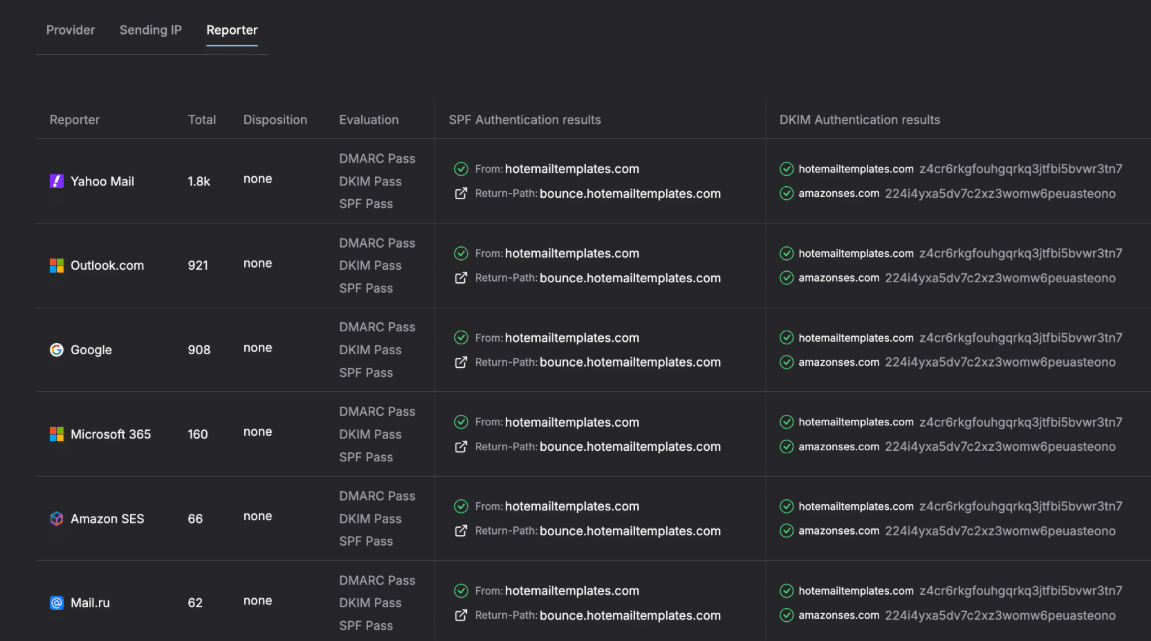
- DMARC (Domain-based Message Authentication, Reporting, and Conformance) – an email authentication protocol that verifies the identity of the sender by aligning the domains used in the email’s From field, Return-Path, and DKIM signature.
Email authentication is implemented by publishing SPF, DKIM, and DMARC TXT records for a sending domain in DNS. For DMARC, it is important to pass alignment either by SPF or DKIM. When an email passes authentication by DMARC, it is considered genuine and is prioritized by email receivers.
To avoid email authentication failures in the future, regular monitoring is needed, in particular:
- Monitoring of SPF, DKIM, and DMARC records;
- Update of the SPF record when shifting to a new sender;
- Publication of a new DKIM record when shifting to a new sender;
- Rotation of DKIM keys;
- Verification of an SPF and DKIM alignment;
- Analysis of DMARC reports;
- Gradual DMARC policy enforcement.
A lot of these tasks can be automated with a DMARC monitoring tool like Dmarkoff that parses DMARC XML files and creates comprehensive reports about a domain’s health and activity over time.
3. Build a Good Domain and IP Reputation.
Both your sending domain and IP address contribute to deliverability. A poor reputation on either can affect email deliverability rates. When speaking about an IP reputation, it is important to differentiate shared and dedicated IP addresses.
Shared IP addresses are assigned by email providers by default and are shared among many clients. Thus, the reputations of shared IP addresses are determined by the sending practices of many senders. Shared IP addresses are a good option for senders with a small and middle email volume.
A dedicated IP is owned by an individual sender who is responsible for the IP reputation. A dedicated IP is recommended for high volume senders (1,000K+ emails per month).
With that said, senders with shared IP addresses should focus on building a good reputation for their sending domain first. Senders with dedicated IPs should focus on building both IP and domain reputation.
Here are good practices recommended for establishing and maintaining a good domain and IP reputation:
- Choose a reputable email service provider utilizing good IP addresses;
- Warm up your domain and a dedicated IP address;
- Separate different email streams (transactional and marketing) by different dedicated IPs and domains (subdomains);
- Monitor your domain and a dedicated IP for being blacklisted and remove them from blacklists timely.
4. Establish Sending Patterns.
Inbox providers like to see consistency in an email volume sent from a domain. Sudden increases and long periods of silence lead to more scrutinized email filtering. The email volume doesn’t matter. Even small senders can have high deliverability rates if they establish a sending pattern and stick to it.
Here are the recommended sending practices for better deliverability:
- Specify your sending frequency (daily, weekly, etc.) and day (i.e. every Monday) on the subscription form or in a confirmation email;
- Set a delay between the messages in a single campaign if your email reputation is not yet well established;
- Spread campaigns dedicated to special occasions over days to avoid spikes in email volume.
5. Track Recipient Engagement.
Recipient engagement is a good signal inbox providers use to decide where an email should go. Opens, replies, forwards, deletions, markings as spam and not spam are taken into account. The more positive engagement the emails receive, the better impact it has on email deliverability.
Consider these recommendations in order to keep your audience engaged:
- Segment your list by the preferences or prior actions (downloads, subscriptions, purchases, site visits, etc.) to send more targeted emails;
- Send a re-subscription email to the recipients who did not act on your emails during a month;
- Remove inactive recipients (3+ months of inactivity) from your list;
- Watch user reported spam rate to ensure it is under 0.3%;
- Identify campaigns that generate a high user reported spam rate and try to find out why it happened (irrelevant offer, misleading Subject line, wrong audience, etc.);
- Always add a visible unsubscribe link to prevent spam reports.
6. Work on Your Email Copy.
The way an email is formatted, as well as its contents, are still examined by spam filters. Invalid HTML tags, broken links, or a missing plain text part increase the likelihood of spam. It is important to create a good email template with a clean HTML code reflecting your brand.
When working on your email copy, keep these tips in mind:
- Use a professional email designer tool to end up with a properly formatted template;
- Include a plain text version of your email when sending it;
- Verify a plan text part to ensure it matches the HTML version;
- Verify URLs and fix broken ones;
- Add the ALT text for the images;
- Avoid using blacklisted domains in the content;
- Set up a custom domain for email tracking if your email service provider supports it;
- Use a good text-to-image ratio (65:35);
- Avoid sending large attachments.
7. Monitor Your Email Placement.
Deliverability is not just whether an email is accepted by a server, but whether it reaches the inbox instead of spam or junk folders. Regular testing and monitoring help identify problems early. Testing email deliverability should be an integral part of your daily workflow. And it’s mandatory when:
- Your email open rates dropped for no obvious reason;
- You shifted to a new email service provider;
- You set up a new sending domain or IP address;
- You created a new email template;
- Your spam complaint rate increased;
- You changed your sending pattern;
- Your recipients let you know your email went to Spam.
Services with built-in email testing capabilities will instantly show where different inbox providers place your email, showcasing possible issues with email content or technical setup.
Conclusion
Regardless of how you measure your email marketing performance – opens, clicks, conversions, signups, page visits – it all makes sense when the messages are delivered to the inboxes of the target recipients.
When email communications fail to perform well, it is recommended to take a set of necessary measures to find and fix the core problem. The first step to take is testing your email deliverability.
When the emails land in spam or junk folders, they typically stay unseen and unopened, which impacts user engagement metrics and reduces email marketing efforts. Following the practices recommended in this article, it is possible to diagnose email deliverability issues, elaborate a good recovery plan, and set up a daily workflow in order to maintain high deliverability rates over time.
Julia works closely with senders every day, providing technical support, troubleshooting deliverability issues, and making complex topics such as email infrastructure, authentication, and sender reputation easier to understand and deal with.