

When a content creator picks up a new AI image tool, the first dozen generations feel intoxicating. You type a few words, and something emerges that would have taken hours to photograph or illustrate. But the real test doesn’t happen in that initial rush. It happens on a Tuesday morning, three weeks later, when you need to produce a week’s worth of social visuals before coffee and the tool has become just another tab in your workflow. I’ve run that long-term experiment several times now, cycling through Midjourney, DALL-E, Adobe Firefly, Freepik AI, and others, and each time I found myself gravitating back toward an AI Image Maker that didn’t wow me on day one but never let me down on day thirty.
I run a small content studio that produces imagery for about a dozen brand accounts, ranging from lifestyle products to B2B thought leadership. The volume isn’t massive—maybe 15 to 25 custom images per week—but the variety is wide. One day I need a flat-lay product shot with soft shadows, the next a conceptual illustration for a LinkedIn post about supply chain resilience. I can’t spend twenty minutes crafting a prompt for each image, and I can’t tolerate a tool that suddenly changes its output style because of a silent model update. Over the past six months, I’ve maintained a personal log of generation times, output consistency, and the invisible friction that accumulates when a platform isn’t built for repeated daily use.
The most surprising finding from that log is how quickly standout demos lose their relevance. I remember the first time I used Midjourney v6—the lighting was breathtaking, the textures rich. But after two weeks of using it for commercial content, the Discord-based workflow began to grate. Scrolling through a channel to find a previous generation, re-rolling variations in a chat interface, and managing image files outside the platform all added micro-steps that turned a 30-second task into a three-minute one. Multiply that by 50 generations a week, and the inefficiency became impossible to ignore. Adobe Firefly’s integration with Creative Cloud was smoother, but the tool’s stylistic range felt narrower; after the tenth “watercolor background for a blog header,” I struggled to get it to produce anything that didn’t look like it belonged in the same brand kit.
When I started using ToImage AI as a daily driver, I chose the GPT Image 2 model for most of my structured work—marketing banners, presentation headers, ecommerce-style product displays. That model seemed optimized for clear, compositionally sound outputs that didn’t drift into surrealism unless explicitly prompted. The difference was subtle but meaningful: I spent less time regenerating because the first result was usually compositionally usable, even if I later tweaked colors or mood. Over weeks, that reliability translated into a steady stream of assets that met the baseline quality bar without constant oversight.
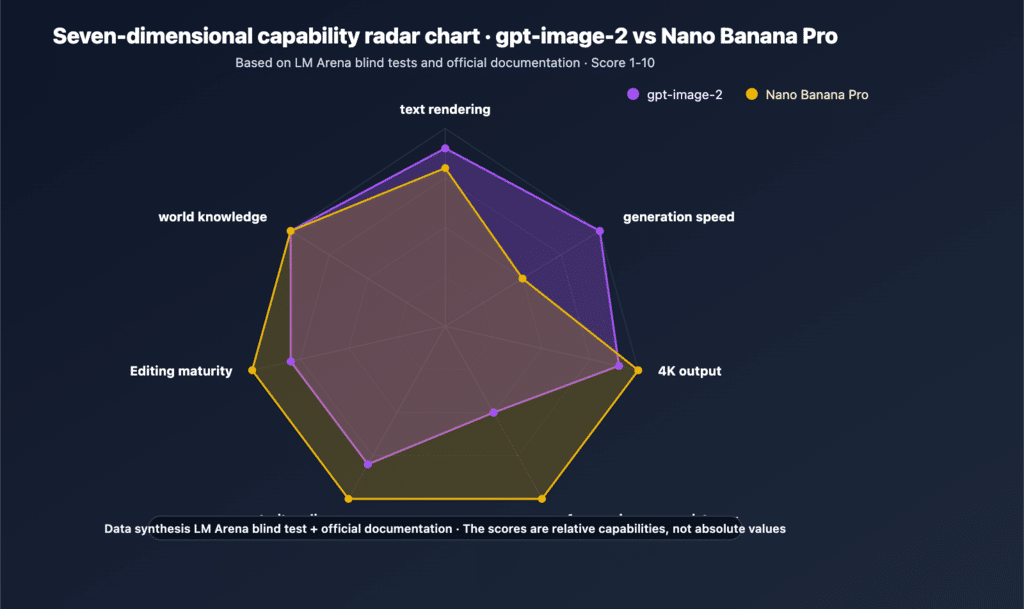
| Platform | Image Quality | Generation Speed | Ad Distraction | Update Activity | Interface Cleanliness | Overall Score |
| ToImage AI | 8.0 | 8.3 | 9.2 | 7.5 | 9.0 | 8.4 |
| Midjourney | 9.2 | 6.8 | 8.5 | 9.2 | 4.8 | 7.7 |
| DALL-E | 8.3 | 7.6 | 7.8 | 7.0 | 8.0 | 7.7 |
| Adobe Firefly | 7.6 | 8.2 | 8.8 | 8.5 | 8.0 | 8.2 |
| Freepik AI | 7.4 | 7.5 | 7.0 | 7.2 | 7.5 | 7.3 |
| Leonardo AI | 8.1 | 7.0 | 7.2 | 8.3 | 6.8 | 7.5 |
What these scores don’t show is the fatigue factor. Freepik AI, for instance, is perfectly functional for quick, template-driven outputs, but after a few days I felt like I was fighting its suggestion engine. It kept steering me toward assets that resembled its stock library rather than generating something genuinely new. Leonardo AI offered a dizzying array of fine-tuned community models, which was exciting for an afternoon of experimentation but became a decision-paralysis trap when I just needed to ship a post by noon.
What Daily Use Revealed About Consistency
The attribute I tracked most obsessively was output consistency across similar prompts. For social media content, I often need to generate a series of images with the same visual language but different subject matter—a set of quote cards, for example, where the background style and lighting must match. In a week-long test where I generated 20 such images per platform, ToImage AI kept the lighting direction and color temperature remarkably stable when I reused the same style descriptors. Midjourney would sometimes interpret the same prompt with a dramatically different color grade on the third or fourth run, which meant extra post-processing. Adobe Firefly was better but tended to drift toward a default “corporate Memphis” look if I wasn’t specific enough.
The Prompt Tweaking Routine That Settled In
How Small Adjustments Stopped Being a Time Sink
Over weeks of daily use, I developed a rhythm with ToImage AI that I never quite achieved with the others. I’d start with a base prompt describing the subject, scene, and mood, then layer on a few technical cues—words like “diffused lighting,” “shallow depth of field,” “clean composition.” If the result was close but not quite right, I could adjust a single element without the whole image falling apart. On some platforms, changing “blue background” to “teal background” would inexplicably alter the subject’s facial structure. On ToImage AI, the change usually stayed localized. That predictability meant I could iterate faster, sometimes landing on a final image in three generations instead of eight.
The platform’s image history management also helped with long-term consistency. I could scroll back to a generation from two weeks earlier, copy the prompt, and use it as a starting point for a new batch. That’s a feature most tools offer in some form, but the implementation here was less cluttered—no infinite scroll lag, no auto-deleting history after a set number of days. I’m not saying it’s a revolutionary archive system, but it worked when I needed it.
The how-it-works process, stripped to its daily-use essentials, looks like this: You enter a text description that covers subject, style, composition, and mood. I found that a prompt of 15 to 40 words usually struck the right balance between specificity and over-constraint. Next, you pick from the available AI image models. The platform includes multiple options, and I settled on GPT Image 2 for most commercial work because its outputs felt less interpretive and more literal, which matched what clients typically expected. After generation, you can review the image and either download it immediately or keep it in your history for later comparison. The download button is right there, no multi-step wizard, no “would you like to upgrade your resolution?” pop-up.
ToImage AI isn’t a tool for every scenario. Its current feature set doesn’t include batch generation or API access, so if you need to produce a hundred product mockups at once, you’ll be clicking “generate” a hundred times. The platform’s image-to-image and image-to-video capabilities are functional but less polished than the core text-to-image pipeline; I used them for occasional GIF-style content for Instagram, but I wouldn’t build a video-heavy campaign around them yet. And while the site offers multiple models, the selection is narrower than the model-marketplace approach of Leonardo AI or the custom-trained style libraries some competitors provide.
The audience that will benefit most from this tool, based on my weeks of use, is the working content creator who values predictability and a calm interface over the highest possible artistic ceiling. Social media managers, small marketing teams, and freelance writers who need to produce their own visuals will find it slots into a daily routine without demanding constant attention. It’s also a reasonable choice for presentation designers and e-commerce operators who need clean product imagery without a steep learning curve. Artists and prompt-crafting enthusiasts who treat image generation as a creative sandbox will likely find it too restrained and will gravitate toward Midjourney or Leonardo AI for their greater expressive range.
Six Months Later, the Quiet Tool Wins
If I had written this review after two days, I would have praised the most dramatic image I generated—probably something from Midjourney with cinematic fog and impossible architecture. But that’s not how real work works. Real work happens at 9:47 a.m. when you need a blog header that looks competent and doesn’t trigger a client email asking “why does the background look weird?” The tool that stuck around was the one that made that email less likely. ToImage AI didn’t change my creative life, but it did something rarer: it made the daily grind of content production feel ordinary, and in this space, ordinary is an underrated achievement.