


Anyone who has opened up a compact consumer electronics device or an industrial sensor knows the reality. We are constantly expected to push more power and data through smaller and smaller enclosures. When engineering teams treat the internal wiring as an afterthought, the result is a tangled mess of loose lines that causes nightmares on the assembly line and guarantees high failure rates in the field.
Addressing this problem takes a fundamental shift in how we approach the design phase. Wiring is not just connecting one component to another. It is a core structural element of the product that requires exact planning from day one.
Integrate Routing into the Mechanical CAD Early
The most common operational mistake I see happens when teams finish the mechanical enclosure and the board design before thinking about how everything actually connects. They hand a pristine 3D model over to manufacturing and expect the assembly team to magically route twenty discrete wires through a millimeter of clearance. This approach inevitably leads to pinched wires, electrical shorts, and delayed product launches.
You have to design the cable routing at the exact same time you design the chassis.
- Give every single wire bundle a dedicated physical channel.
- Use your CAD software to simulate the exact bend radius of the wires you plan to use.
- If you work closely with a PCB Assembly Manufacturer early in the product development cycle, they will usually flag these physical clearance issues before you lock in the hard tooling for your enclosure.
Fixing a layout conflict in a software model costs nothing. Trying to fix it on the factory floor with secondary operations is incredibly expensive.
Consolidate Connections with Bundling Strategies
Having dozens of individual wires running randomly across a chassis is a direct invitation for human error during the build process. You want to group as many connections together as physically and electrically possible.
A custom wiring harness takes all those loose chaotic connections and groups them into a single installable unit. Instead of an operator making fifteen separate tricky terminations by hand, they drop in one pre-tied harness and plug in a few multipin connectors. This cuts assembly time down drastically.
You just have to watch out for electromagnetic interference when bundling. Keep your noisy power lines strictly separated from your sensitive low-voltage data signals. A proper design groups lines logically and wraps them in a material that dictates exactly how they sit in the enclosure, preventing wandering wires from interfering with moving parts or hot components.
Adopt Flat Flex Cables for Tight Spaces
Traditional round wire is bulky and difficult to manage in small areas. When you are fighting for every fraction of a millimeter in a wearable device or a handheld medical monitor, standard wire bundles simply take up too much vertical space.
Flat flex cables solve this vertical space issue completely.
- They route cleanly against the inner walls of an enclosure and can fold at crisp angles to navigate around structural standoffs.
- Because the conductors are locked in parallel, they completely eliminate the chance of an assembly worker crossing wires by mistake.
- If your design features two boards stacked on top of each other, flat cables provide a highly reliable low-profile bridge that stays entirely out of the way of your other surface-mounted components.
Standardize Connectors and Pinouts
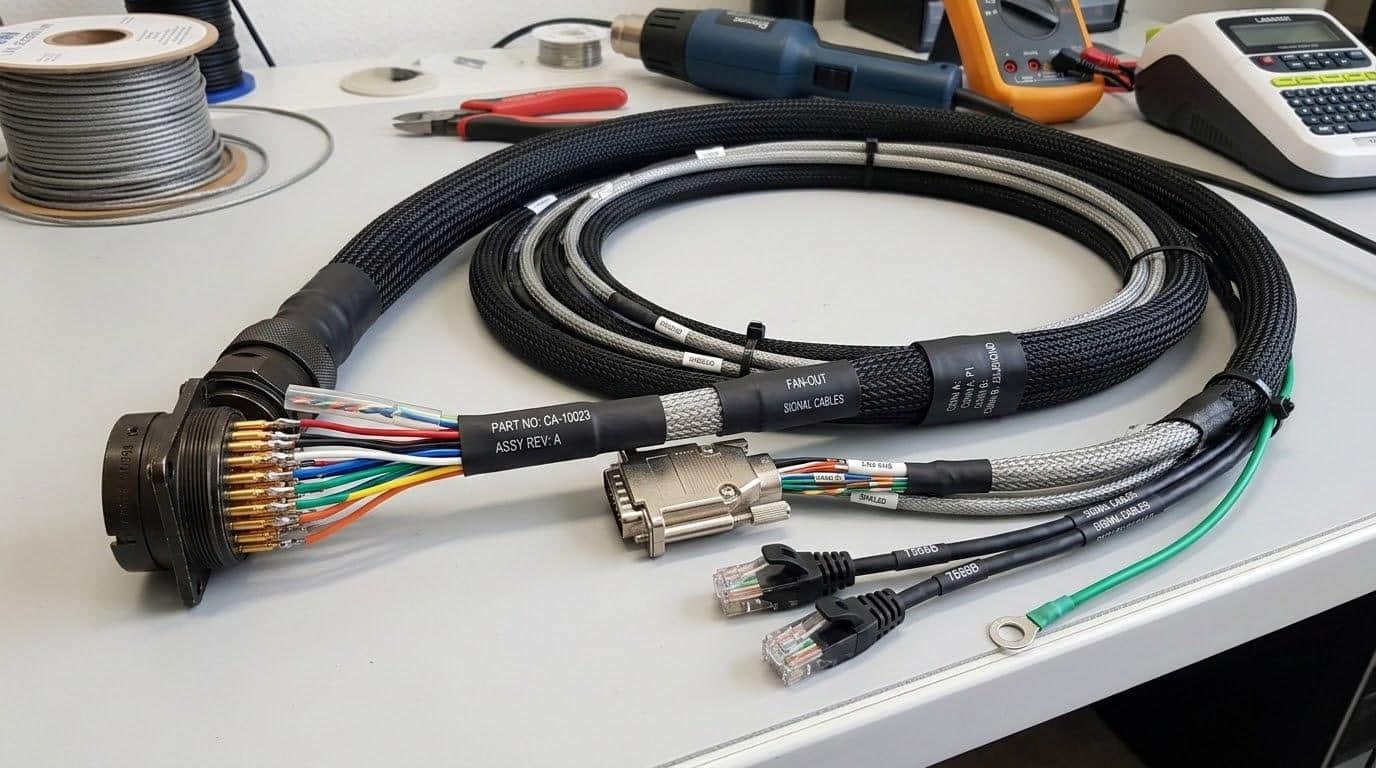
Every time you introduce a new unique connector type to a build, you introduce a new potential point of failure and a new tooling requirement for the factory. Look closely at your overall schematic and see where you can standardize the hardware.
If your device has three different external sensor modules, try to use the same four-pin connector for all of them. Just make sure you key them differently or physically group them so an operator cannot accidentally plug a thermal sensor into the optical sensor port. Sometimes ordering a custom cable assembly makes more financial sense than buying off the shelf parts, especially if it allows you to unify the connector families across your entire product line. Keeping your bill of materials small and standardized simplifies the supply chain and makes field repairs much more straightforward for the end user.
Implement Proper Strain Relief
Wires break right where they meet the connector. It’s the most common failure point in any piece of hardware that experiences vibration or movement. You can’t just crimp a wire into a housing and hope it survives a drop test.
Strain relief transfers the physical stress away from the fragile electrical connection and onto the sturdy outer jacket of the cable. You can use:
- Heat shrink tubing
- Mechanical clamps built into the plastic enclosure
- Overmolded connectors
The choice depends on the budget and space constraints. The method matters less than the application. If a wire is going to be pulled, twisted, or subjected to thermal expansion, it needs structural support at the termination point. Skipping this step might save a few pennies per unit, but the resulting warranty claims will quickly wipe out those savings.
Leave Room for Serviceability and Maintenance
Designs that look sleek and perfectly packed on a computer screen often fail miserably in the hands of a repair technician. If a piece of equipment has to be serviced over its lifespan, the technician needs room to disconnect the components without ripping the wires out of their crimps. Always leave a service loop. A little bit of intentional slack goes a long way when someone is trying to replace a lithium battery or swap out a faulty display panel. Route the connections so the most commonly replaced parts are the easiest to unplug without disturbing the rest of the system. Color code the critical power and ground paths if space allows.
The ultimate goal is to make the internal layout intuitive so the person opening the device later doesn’t need a hundred- age schematic just to figure out how to safely take the cover off. Wiring should guide the repair process, not obstruct it.